3
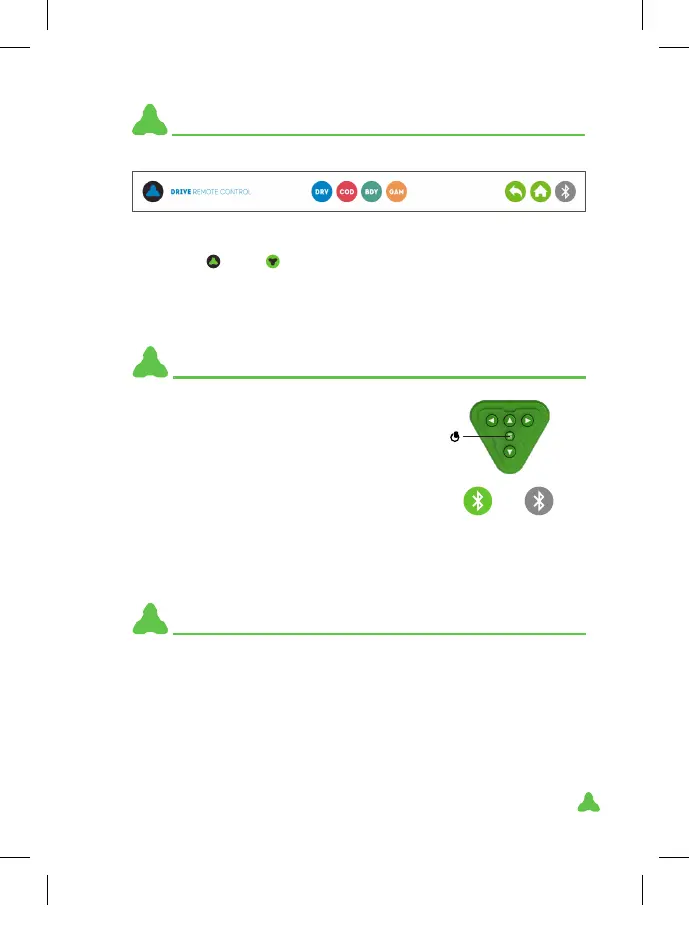
This basic menu always appears at the top:
1. Robot
or vehicle
model.
2. Direct access to: DRIVE game mode.
3. Direct access to: CODING game mode.
4. Direct access to: BUDDY game mode.
5. Direct access to: GAME mode.
6. Back.
7. Start.
8. Bluetooth.
BASIC ICONS
1 2 3 4 5 6 7 8
1. Turn on the robot with the central button.
2. Press the Bluetooth button at the top right
of the screen. (Bluetooth icon)
3. Select “Mazzy”.
4. If paired-up correctly, the robot will beep
twice and the Bluetooth button will change
to green.
When the robot is inactive for 5 minutes, it automatically shuts down.
It emits a brief beep every minute for ve minutes and changes its
facial expression to warn you.
The robot does not enter rest mode when paired.
LOW BATTERY: when it has a low battery, the robot changes its facial
expression, makes a sound and switches o automatically.
PAIRING ROBOT WITH DEVICE
SLEEP MODE
ON OFF
DISACTIVATE
To unpair press the Bluetooth button again. The robot will beep and
the button will change to grey.
XT380851_MAZZY-IMAPP-EN-v5.indd 3 29/5/20 10:54



 To Next Page