11
Power Saving
To save power, the device will automatically switch o when motionless
for a period of time. After 15 seconds of inactivity, the device screen will
dim in preparation for switch o. The device reactivates when it detects
movement. However, if the period of inactivity continues for a total of 3
minutes, the device will switch o. When this occurs, the device can be
switched back on by a single push of the power button.
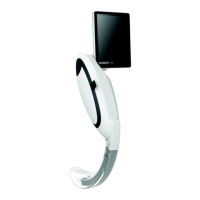
Disposable Laryngoscope Blade Fitting
To t the blade, open the peel pouch and slide the blade over the
CameraStick™ portion of the device. The blade is correctly tted when
the blade clip is rmly latched to the CameraStick™. Remove the blade
from the peel pouch just prior to intubation. To remove the blade after
intubation, lift the clip, pull the blade o and dispose of according to
local regulations.
Using the Laryngoscope
Multiple disposable blade types are available for use with the
McGRATH™ MAC Video laryngoscopes. The McGRATH™ MAC range
of disposable blades are for use with routine and dicult airways.
The McGRATH™ X blade™ range are for use with dicult and extreme
airways. These blades require dierent techniques which are explained
below.
McGRATH™ MAC blade (for graphical representation, refer to quick
start guide included within the packaging)
1. If possible, position the patient in the optimal position for direct
laryngoscopy.
2. Look into the mouth; insert the blade into the right side of the
mouth.
3. Move the device to a central position while sweeping the tongue
to the left.
4. Advance the tip of the McGRATH™ MAC blade into the vallecula.
5. Visualize the epiglottis on the screen. Lift the anatomy forwards and
upwards to expose a direct and indirect view of the glottis. When the
device is in the optimal position the glottis should be viewed in the
central upper section of the screen.


 To Next Page
 Loading...