2
3
GETTING STARTED
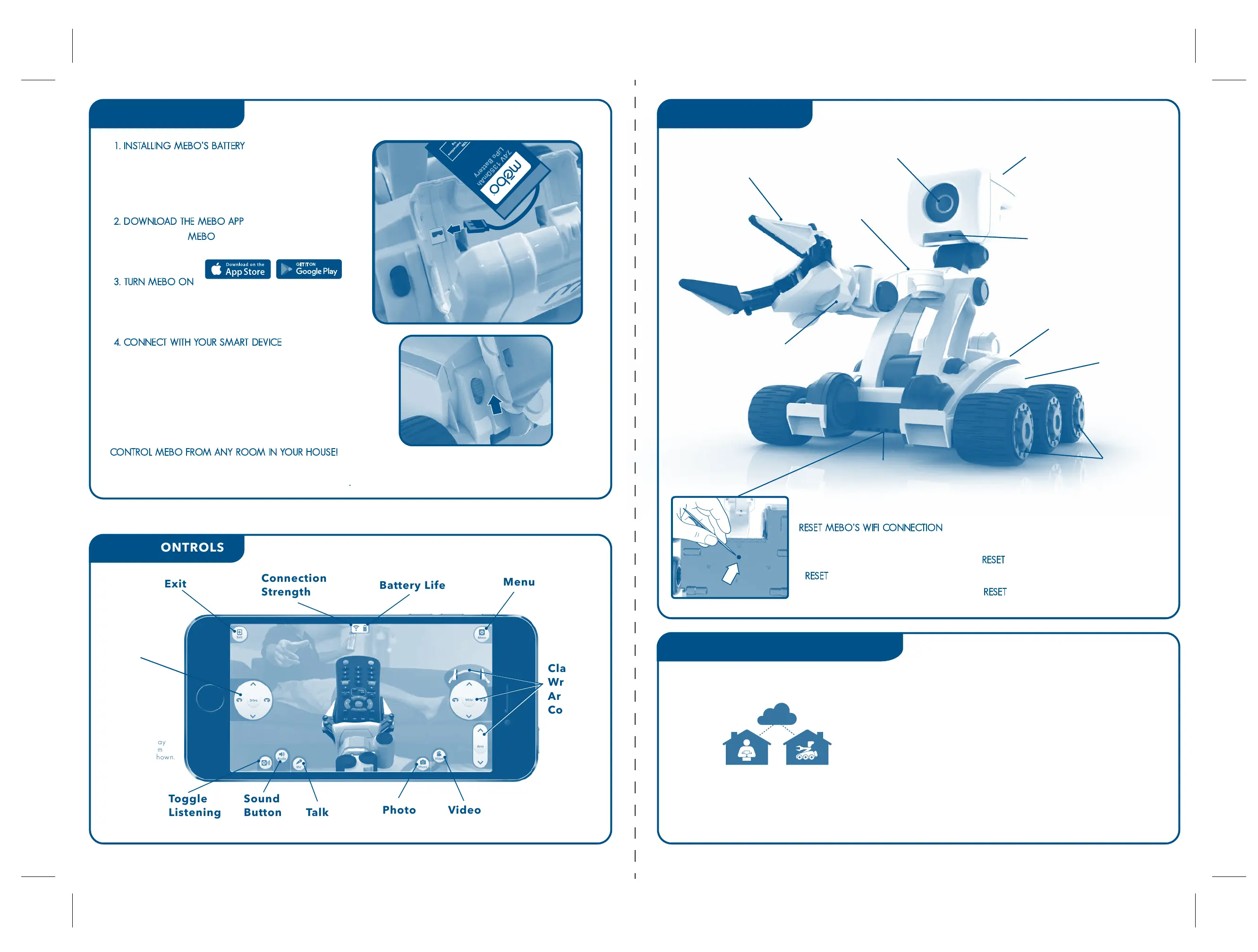
MEBO CONTROLS
1. INSTALLING MEBO’S BATTERY
• Open the battery compartment on the back of Mebo.
• Plug the battery into the enclosed connector. Rest
the battery inside and close the compartment door.
2. DOWNLOAD THE MEBO APP
• Download the MEBO app and install onto your smart
phone or tablet.
3. TURN MEBO ON
• Flip the power switch on the back of Mebo to turn on.
Mebo will light up and flash when turned on.
4. CONNECT WITH YOUR SMART DEVICE
• Enable the Wi-Fi on your phone or tablet and select
MEBO - xx-xx-xx (name of connection may differ slightly
from this example on your Wi-Fi network list).
• Mebo will stop flashing when successfully
connected to Wi-Fi and the app.
• Once connected please follow in App instructions.
CONTROL MEBO FROM ANYWHERE
Eye (Camera Lens) Speaker
Battery
Compartment
ON/OFF
Switch
Claw*
Drive
Control
Sound
Button
Toggle
Listening Talk
Menu may
vary from
image shown.
Menu
Connection
Strength
Exit
Battery Life
Photo Video
Claw
Wrist
Arm
Controls
Wrist
Arm
Reset Button
(on Bottom Panel)
Drive Wheels
See from Mebo’s point of view through your smart phone or
tablet and you can control him discretely from another room.
With an internet connection, you can even control him from a
friend’s house down the street or the other side of the world!
See app for details.
MEBO SPECS
P2P REMOTE WIFI CONNECTION
Microphone
Claw
INTERNET
Mebo’s wrist has 180°
rotational range!
*Mebo’s lift capacity should not exceed 250g
RESET MEBO’S WIFI CONNECTION
• If Mebo is unresponsive OR if Mebo has been set to connect to a Wi-Fi network that is
no longer available, you may need to press RESET to clear and reset Mebo.
• RESET can also be used to clear a Wi-Fi password if you have forgotten it.
• Use a pin or unfolded paperclip to press the RESET button and hold for 5 seconds.
RESET
CONTROL MEBO FROM ANY ROOM IN YOUR HOUSE!
You can control Mebo from even further away in your house by connecting through your home
Wi-Fi instead of your device’s Wi-Fi. Go to your app settings..



 To Previous Page
 Loading...