5
EN
Due to continuous development specication and
appearance of product are subject to change with-
out prior notice. For technical support please visit
www.media-tech.eu.
Media control – use your smartphone to play
music, then answer/end button can be used
to start/pause music, hold volume up to skip
next track, hold volume down to skip previous
track.
Pairing with two Bluetooth
mobile devices.
You can pair this headset with one or two
mobile devices. When you successfully pair
headset with one smartphone “A” power o
headset and smartphone “A”. Now power on
smartphone “B” and power on headset, now
perform pairing procedure like you did with
smartphone “A”. After successful pairing with
smartphone “A” and “B” whenever they are in
range of headset will automatically connect
to headset.
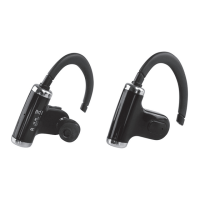
Using one earpiece
You can use only one earpiece (master) – it will
work as mono audio device with microphone.
When you connect master earpiece to slave
earpiece (via USB cable) it will work as stereo
audio device with microphone.


 To Next Page