EasyManua.ls Logo

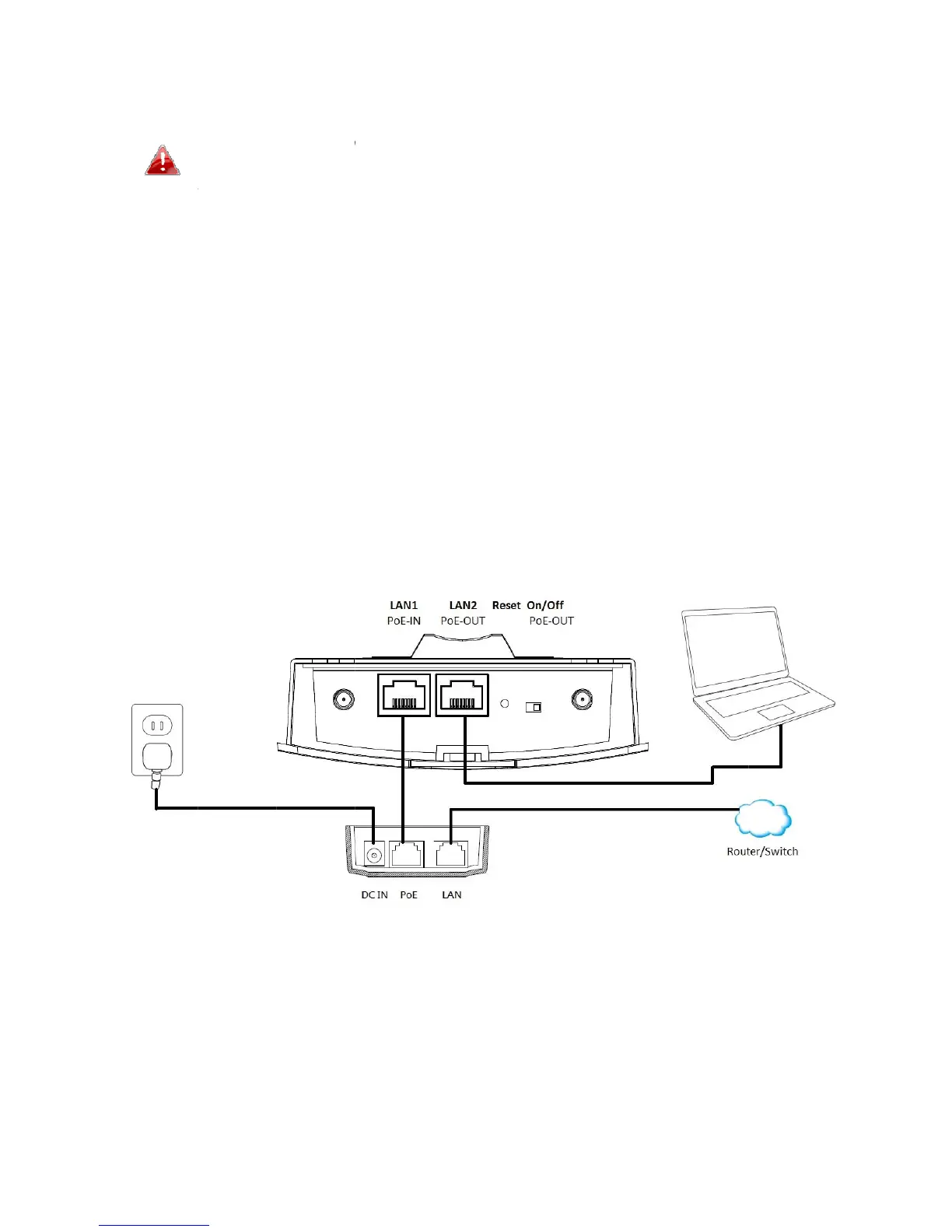
MEDIATEK MT7621A - Initial Physical Setup

MEDIATEK MT7621A
13 pages
Print Icon
To Next Page IconTo Next Page
To Previous Page IconTo Previous Page
Loading...
II
1
2
3
1. Ini
D
O
d
. Conne
portvi
. Conne
adapt
e
isread
. Usea
n
netwo
conne
c
tialSetu
D
onotco
n
O
UT)port
.
d
evice.
ctthea
c
aEthern
cttheP
o
e
r.Wait
a
ywhen
t
n
Ethern
e
rk:rout
e
c
tacom
p
n
necta
n
.
TheLA
N
c
cesspoi
etcable
.
o
Einject
o
a
mome
n
t
hePow
e
e
tcable
t
e
rorswi
t
puterdi
r
n
onPoE
d
N
2porto
nt’sLAN
.
o
rtoap
o
n
tforth
e
e
rLEDis
t
oconne
t
ch.Ifit’
s
r
ectlyto
6
d
eviceto
utputs4
8
1(PoEI
N
o
werso
u
e
access
blue.
cttheP
o
s
morec
o
theacc
e
theacce
s
8
Vandc
a
N
)portt
o
u
rceusi
n
pointto
o
Einject
o
o
nvenie
n
e
sspoint
s
spoint’
s
a
ndama
g
o
thePo
E
n
gthein
c
startup
.
o
r’sLAN
n
tforini
t
sLAN2
p
s
LAN2(P
g
eanon
E
injecto
c
ludedp
o
.
Theac
c
portto
y
t
ialsetu
p
p
ortinst
e
oE‐
PoE
r’sPoE
o
wer
c
esspoin
y
our
p
,youca
e
ad.
t
n