If you accidentally added too many minutes press the keep warm / cancel button
to cancel the function and start over.
Once you have set the desired pressure holding time, press the function
menu button. The pressure will start to build in 5 seconds. This process may take a
few minutes. The indicator light on the function menu button will illuminate and the
pressure holding time will display.
2. When the working pressure level has been reached, a “P” will display on
the left side of display panel. At this point the pressure holding time (which is dis-
played on the display panel) will begin to decrease in 1 minute intervals.
3. When the cooking process is complete you will hear a series of beeps
signaling the completion of the cooking process. The indicator light on the keep /
warm cancel button will ash indicating that the pressure inside the cooker is being
released but remains at high level. NOTE: For reasons of your safety, DO NOT
open the lid when the pressure is level is high and the indicator light on and the keep
warm button is ashing.
When the pressure level is at a safe level and lid of the pressure cooker can
be safely removed the indicator light on the keep warm button will stop ashing and
will remain on (solid) indicating the keep warm function has begun.
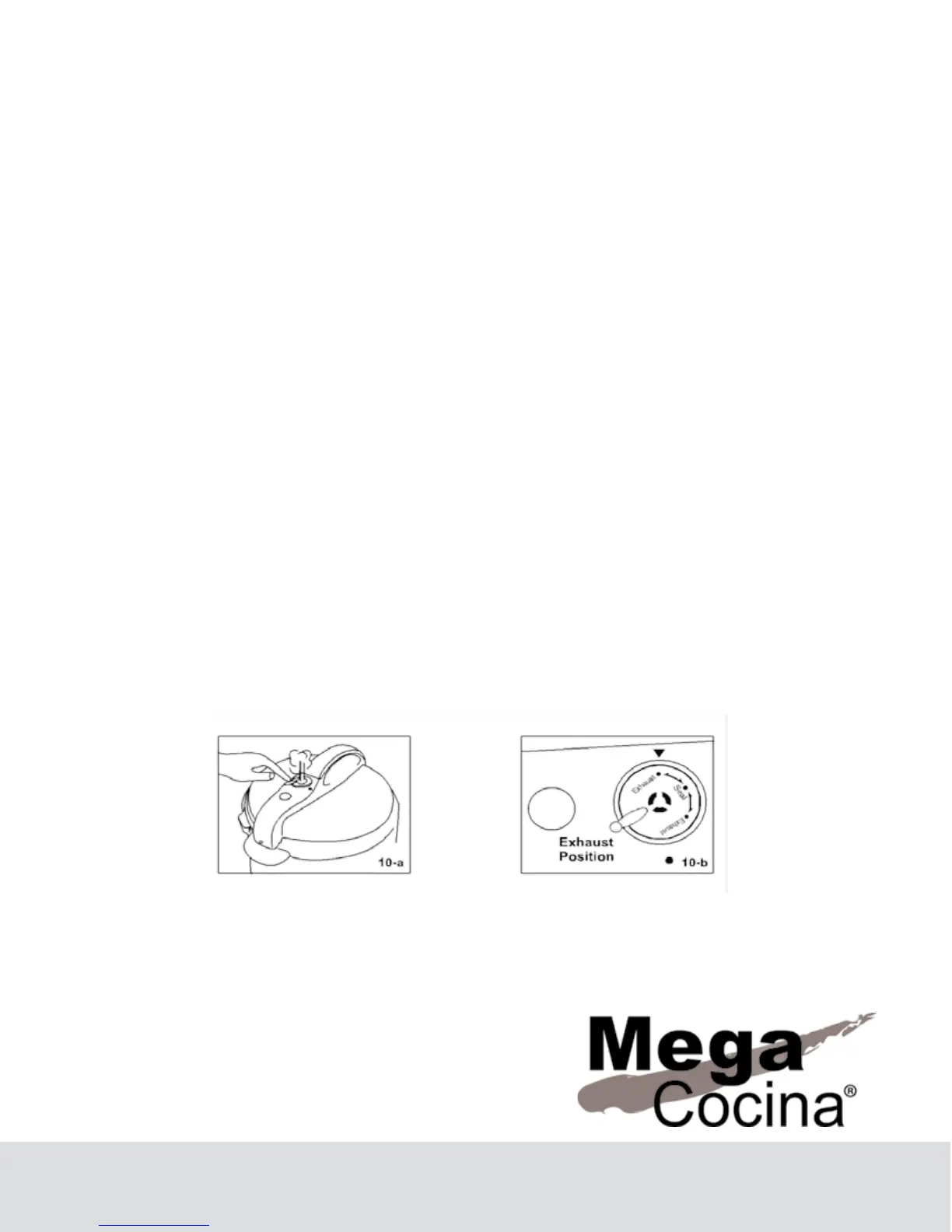
NOTE: If you wish to shorten the required amount of time to release the pressure,
carefully set the pressure regulator valve to EXHAUST to release steam until the
oating valve drops.
When expandable foods such as rice are cooked, the pressure regulator valve can-
not be raised immediately after the Keep Warm indicator begins to ash. Please wait
until the oating valve is no longer oating to raise the pressure discharging valve.
8


 To Next Page