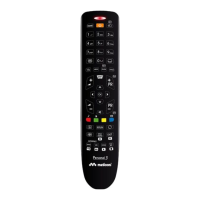
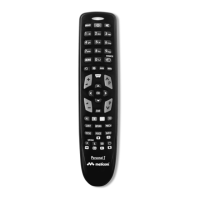
The spare remote control GumBody Personal 1 is ideal to replace the original remote control of Samsung
television sets with a CRT - LED - LCD and PLASMA screen of the series shown on the exterior of the package.
After inserting the batteries the remote control is ready to use, without any setup required.
BUTTON AND FUNCTION USE
Direct access to channels
Confi rms the setting
Selects the HDMI mode directly
Displays and selects the
available video sources
Link to various services and applications,
it displays the home page of contents
Temporarily mutes the audio
Turns the TV on and off
Returns to the previous Menu
Link to various services and applications,
it displays the home page of contents
Displays the EPG
(Electronic Programme Guide)
Displays the main OSD menu
Enables SECONDARY FUNCTIONS
Changes channels
Moves the cursor and selects an item
Adjusts the volume
Exits from the menu
Use these buttons for the Channel
list, Channel management, Personal
contents menus, etc.
Displays the list of channels on the TV screen
Back to the previous menu
Back to the previous channel
Shortcut for frequently used functions
Displays the information on
the TV screen
Selection of the image format
Selects the image mode
Selects the audio mode
Toggles between the Teletext ON,
Double, Mixed and OFF modes
Direct selection of the TV mode
Transmission indicator light
N0000089 Istruzioni PERSONAL 1.indd 6N0000089 Istruzioni PERSONAL 1.indd 6 10/05/16 11:5410/05/16 11:54


 To Next Page
 Loading...