EasyManua.ls Logo

MELICONI SENIOR 2 RC - BUTTONS AND FUNCTIONS USE

MELICONI SENIOR 2 RC
7 pages
Print Icon
To Next Page IconTo Next Page
To Previous Page IconTo Previous Page
Loading...
IMPORTANT: sometimes, to switch on the TV, you must hold the [ALT] button and press a numeric key.
The functions of the buttons described below are available only if they are also present on the original device
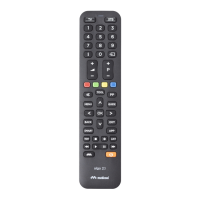
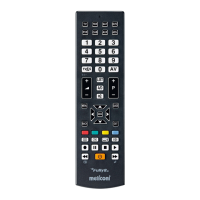
BUTTONS AND FUNCTIONS USE
ON / OFF - switches
the decoder ON and OFF
Numeric keypad
Selects digital TV
and radio
Volume control +/
MENU control
Arrows used to move
around the MENU
FASTEXT functions
or for selecting
submenus using colours
MUTE - turns
sound OFF and ON
TELETEXT control
For selecting an
external input source
For selecting the next P+ or
the previous P programm
Rubber protection
Confirm selection
ON / OFF - switches
the TV OFF and in
some cases ON
Indicator light
Selects the screen
display format
Pressed together to a button
generates the function in the
other user mode (TV / STB)

Related product manuals