7
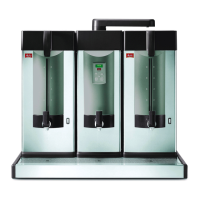
1. Description of parts
1. »ON - OFF« button
2. » - « button
3. Display
4. » + « button
5. » Timer « button
6. » START - STOP « button
7. Hot water unit
8. Swivel arm
9. Stopper
10. Lid
11. PYRAMID filter
12. Condensate lid
13. Carrying handle
14. Sight glass
15. Heated storage urn
16. On / Off switch for storage urn
17. Fast-action tap
18. Drip tray
19. Base unit
20. Connecting lead
21. Plug socket
22. Fast-action tap for hot water
2. Display
The backlit display (3) shows all information relevant to the
machine’s operation. The following display messages are
only examples.
As soon as the machine is connected to the mains supply,
the machine model type is displayed
3. Starting operation, Filtering
For the initial operation and after longer periods of inactivi-
ty, run the machine with water only before the first prepara-
tion of beverages.
The Melitta System and its principle of unpressurized filte-
ring guarantees a high rate of coffee extraction, i.e. full use
of the flavour and aroma substances in the ground coffee.
The optimum yield and quality can only be achieved, howe-
ver, if the quantity of water is in correct proportion to the gro-
und coffee dosage. This relationship is not always constant,
though. It depends, for example, on the coffee blend as well
as the quantity to be filtered.
If only 1 litre is to be prepared, 7 g/cup might be necessary,
whereas for large quantities 5 g/cup is often sufficient.
This means, therefore, that to maintain a constant coffee
quality a smaller coffee dosage must be chosen for increa-
sing filtering volumes
.
A few trial filtering runs might be advisable to discover the
best dosage levels.
• Pre-heat the storage urn before use with hot water and
the heater switched on. The storage urn temperature
immediately rises to 80-85∞ C.
•
Please only operate the machine with the condensate
lid (12) in place, in order to prevent any loss of heat or
quality.
M620
3.1 Starting operation
Before operation make sure that the water tap is open and
the electrical supply is switched on.
• Press briefly button (1) .
The display (3) shows the amount of litres of the sel-
ected brewing volume, e.g.
The machine begins to heat up. Operating temperatu-
re is reached after about 6 minutes.
• Connect the heated storage urn (15) to the plug socket
(21) with the connecting lead (20).
Caution: the 230V plug sockets are only fused for the
storage urns. Do not connect any other electrical
appliances.
• Position storage urn directly next to hot water unit (7).
For filtering units, position serving trolley directly next
to main unit. Switch on heater for storage urn (16).
• Pre-heat the storage urn with hot water (approx. 2 lit-
res) for about 10 minutes. Discharge water through tap
(17).
• Position condensate lid (12) in the storage urn.
• Insert filter paper (fold up embossed bottom) into filter
(11) and fill in ground coffee or tea.
Recommended volumes:
Coffee = approx. 5 - 7 g/cup or approx. 35 - 50 g/litre
Tea = approx. 1.5 g/cup or approx. 5 - 12 g/litre.
Use MELITTA PYRAMID filter papers
Pa 206 G, Order No.: 1014259, or
Pa 220 G, Order No.: 1014228.
• Place filter on the storage urn and close with lid (10).
Please take care that the stopper (9) is not inserted.
• Position swivel arm (8) directly above the opening in
the lid.
3.2 Program selection
• Using buttons (2) and (4) you can
select the desired quantity. The amount can now be
entered without delay, also in fast search mode if the
button is held depressed.
3.3 Filtering
• Press button (6) . The selected litre quantity
is programed, the brewing process begins, a three-
tone signal sounds. The display shows the current fil-
tering program:
• Caution: if the storage urn and/or swivel arm are not
correctly positioned, the filtering process cannot begin.
Brewing
20 Ltr.


 To Next Page
 Loading...