10
Installation (continued)
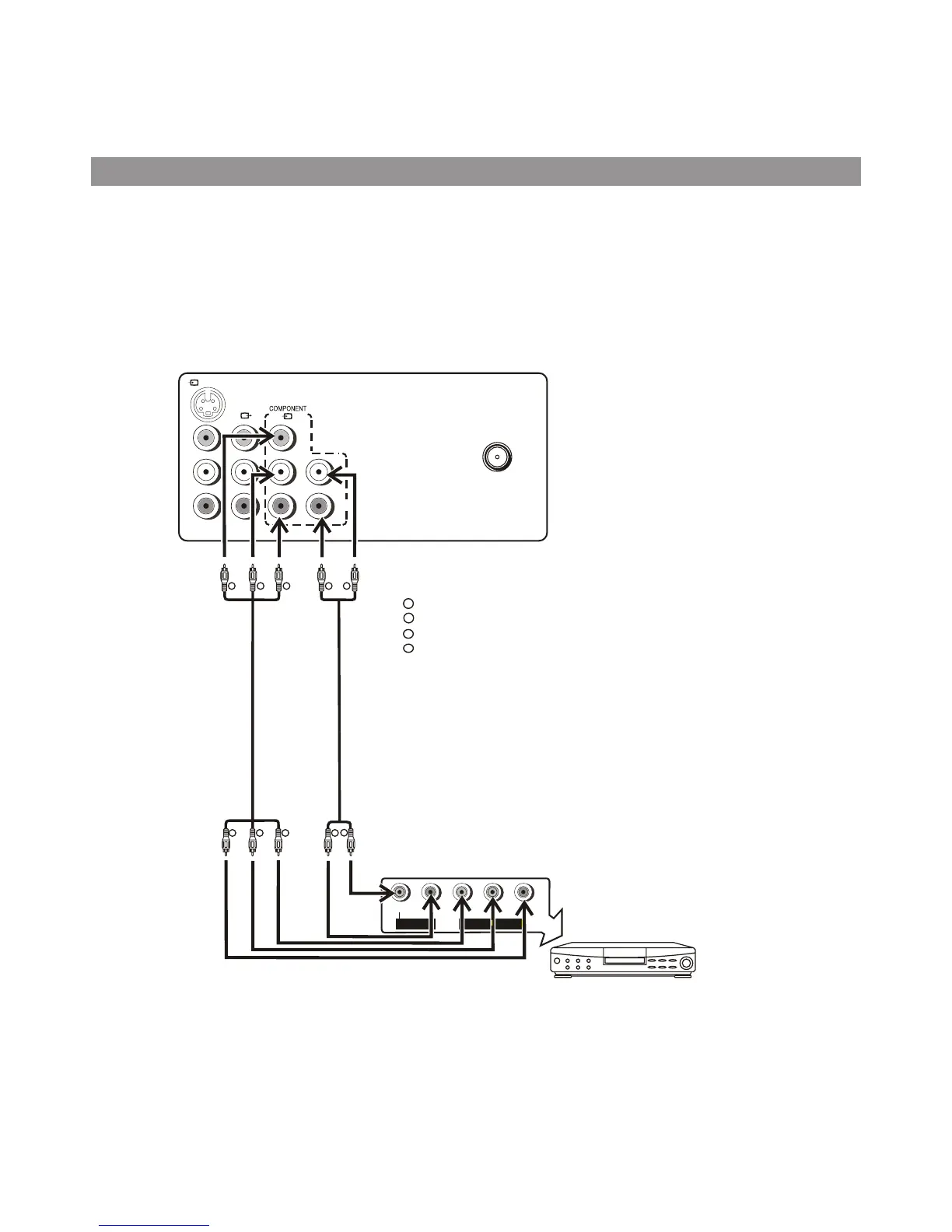
Connecting DVD input
Connect the component video cable between Y, C B,CR input terminals on the unit and Y, C B,CR output terminals on
the
DVD player.
Connect the Audio cable between the audio input terminals on the unit and audio output terminals on the DVD
player.
To view the program from the COMPONENT input terminals, please press INPUT button on the remote control
repeatedly until COMPONENT appears on the screen.
Note:
This unit can only receive YC
bCr
signal but not YP
bPr signal through
DVD input.
G
G
B
B
R
R
R
R
W
W
L
COMPONENT OUTPUT
AUDIO OUTPUT
Y
C
b
C
r
R
w
R
G
B
:White (audio L/MONO )
:Green (Y)
:Blue (C
b)
:Red (audio R,Cr)
Video Cable
Audio Cable
DVD Player, STB, etc
S-VIDEO
VIDEO
L/MONO
R
VIDEO
L
AUDIO
R
AUDIO
(1)
RF
Y
C
b
C
r
L/MONO
R
AUDIO



 To Next Page