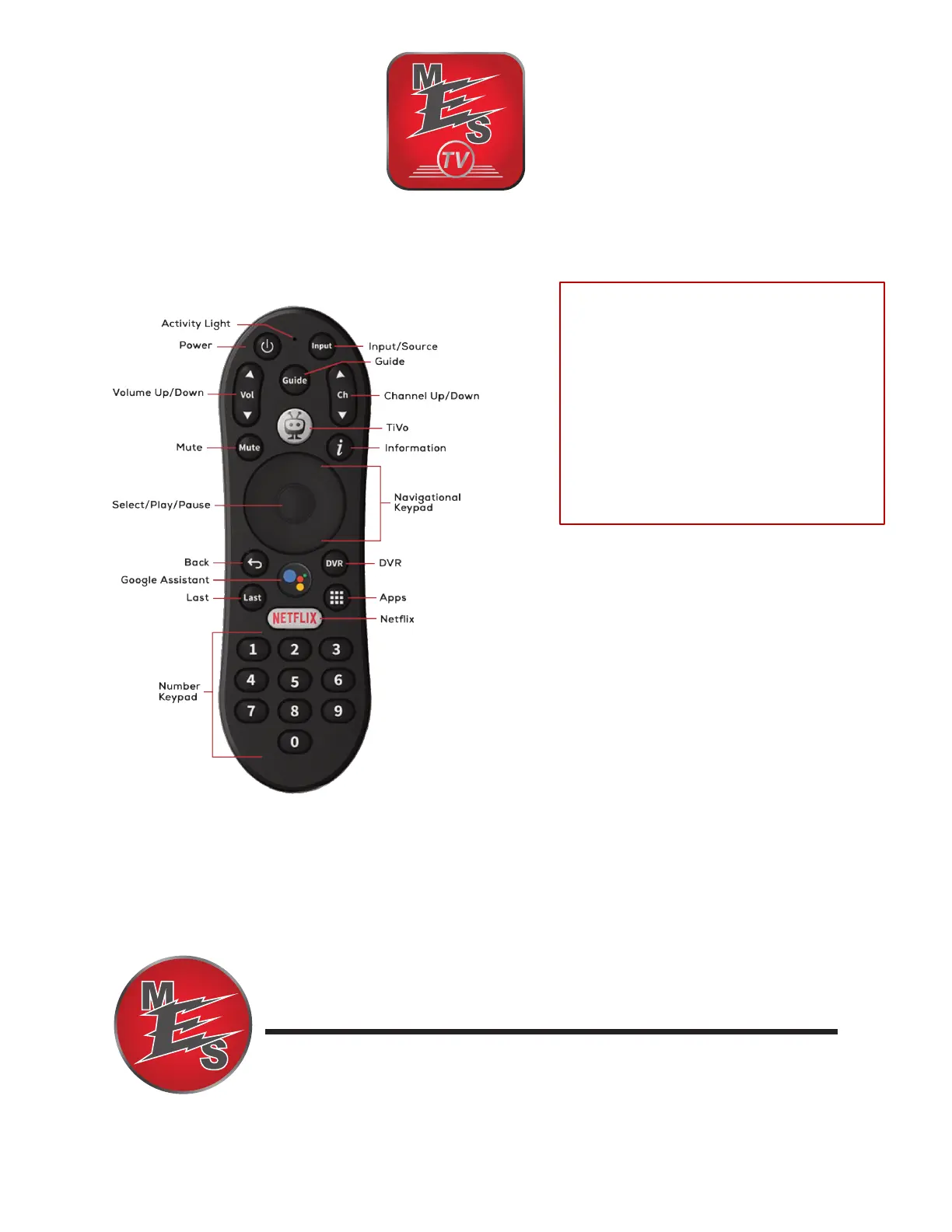
MESTV Box (Evo Force 1) Remote Guide
Questions? Call our Customer
Service Specialists at
(270) 753-5312
MURRAY ELECTRIC SYSTEM
ELECTRIC POWER & TELECOMMUNICATIONS
Key Features
• The TiVo button brings up the following
options: Home, Guide, Shows, Movies, Apps,
Profile, Netflix, Search, Settings,
Notifications.
• The Apps button brings you to a screen with
all of your downloaded apps. Go to the
Google Play Store app to download new
apps.
• Google Assistant can be used to search for
Shows/Movies and show fi they are available
within MESTV or on another app.
Replacement Remote Pairing
Long press the TiVo and Back buttons
at the same time, until the Activity
Light flashes quickly, then release.
That means the remote has entered
pairing mode. Wait a few seconds
without pressing any buttons until
you see the pop-up message of
pairing success on the TV.


 To Previous Page
 Loading...