MFJ-1278 & MFJ-1278T Fast-Start Manual
3
4. Turn on the MFJ-1278.
5. Press the "Return" key several times in succession.
MFJ-1278 will sign-on with the sign-on message and end with the CMD: command prompt.
If the sign-on message is garbled, this may be caused by the wordlength and parity of MFJ-
1278 not matching the terminal parameters. Remove the cover of the MFJ-1278 and discon-
nect the shorting Jumper at JMP5. JMP 5 is located next to the battery. After about 2 minutes,
reconnect the shorting Jumper at JMP5.
Note: Removing JMP 5 disconnects the memory backup battery and resets all MFJ-127S para-
meters to default values. The wordlength and parity default values of the MFJ-1278 are 8 bits
and no parity. This matches the terminal parameters äs suggested above in step 3.
6. After the MFJ-1278 has signed on and the CMD: command prompt is displayed, type "Display"
and press "Return" key.
MFJ-1278 will display a long list of parameter and end with the CMD: command prompt.
The above procedure verifies that the MFJ-1278 is communicating with your Computer.
C. Radio Interface
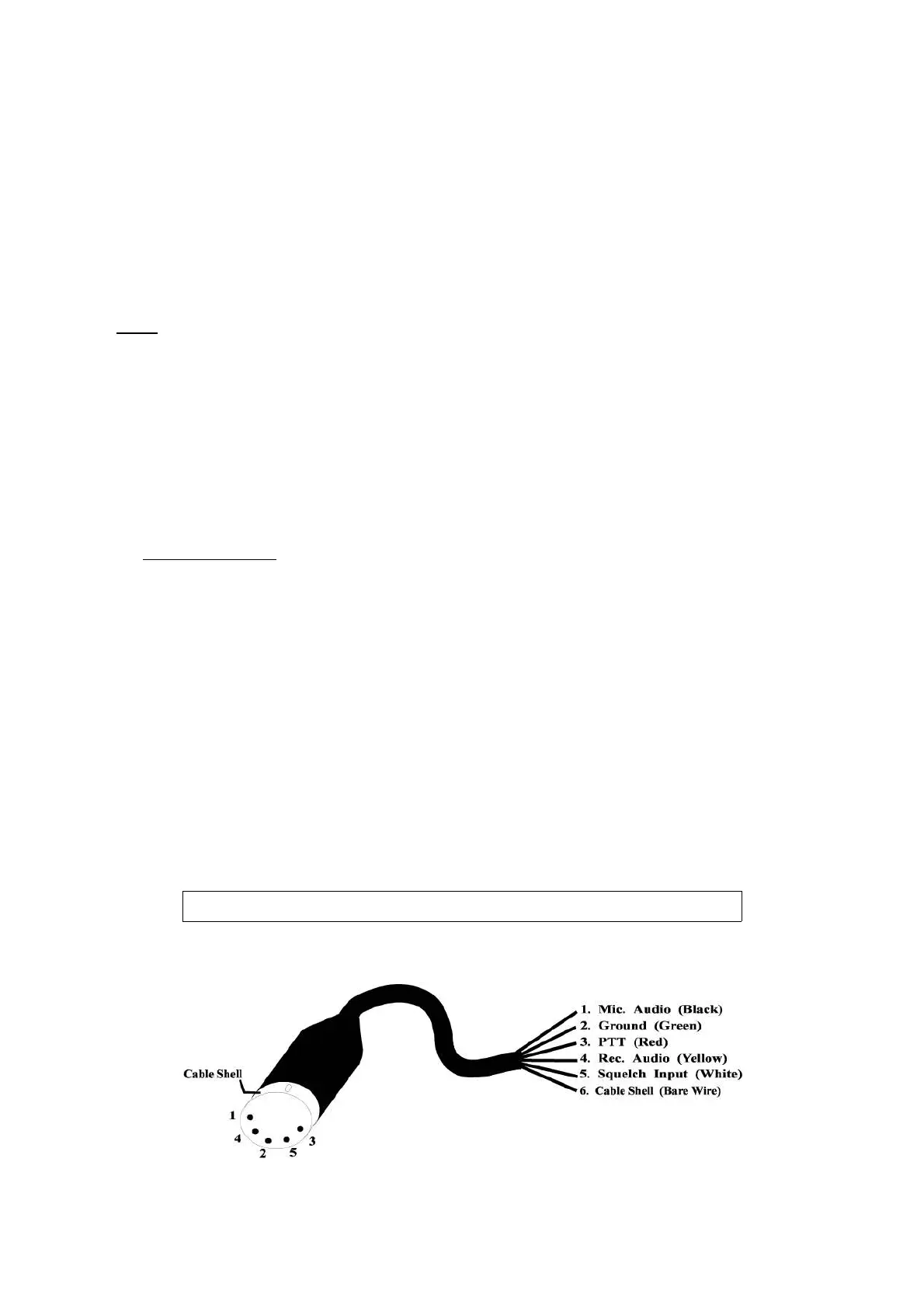
The first step in connecting the MFJ-1278 is to wire a cable to connect the MFJ-1278 Radio Port to
the microphone or accessory connector of the radio. The radio cable supplied with your MFJ-1278
has one end already wired with a 5-pin DIN connector. You will need to wire the other connector
to this cable to fit your radio.
MFJ offers optional pre-assembled cable to connect the MFJ-1278 to some radios. Contact MFJ
dealer or MFJ for more information about these pre-assembled cables. Also available from MFJ
dealer or from MFJ is a "TNC-to-Microphone" switch box (MFJ-1272B) which allows you to switch
your radio between using the MFJ-1278 or using the microphone without disconnecting cables.
Contact MFJ or MFJ dealer for more information concerning this TNC/MIC switch box. If pre-as-
sembled cable or switch box is not available you must wire a cable to fit your radio.
IMPORTANT: The audio input to the MFJ-1278 must be fed though pin 4 of the MFJ-1278 radio
Port. DO NOT feed audio input though the Speaker jack in the rear of the MFJ-1278.
The Speaker Jack is used to connect a Speaker. It is NOT an audio input.
1. Wire the radio cable to MFJ-1278 as shown by the following diagram:
Radio Port Cable


 To Next Page
 Loading...

