AIRCONDITIONINGANDAUDIOSYSTEMS
PairingwithaMobilePhone
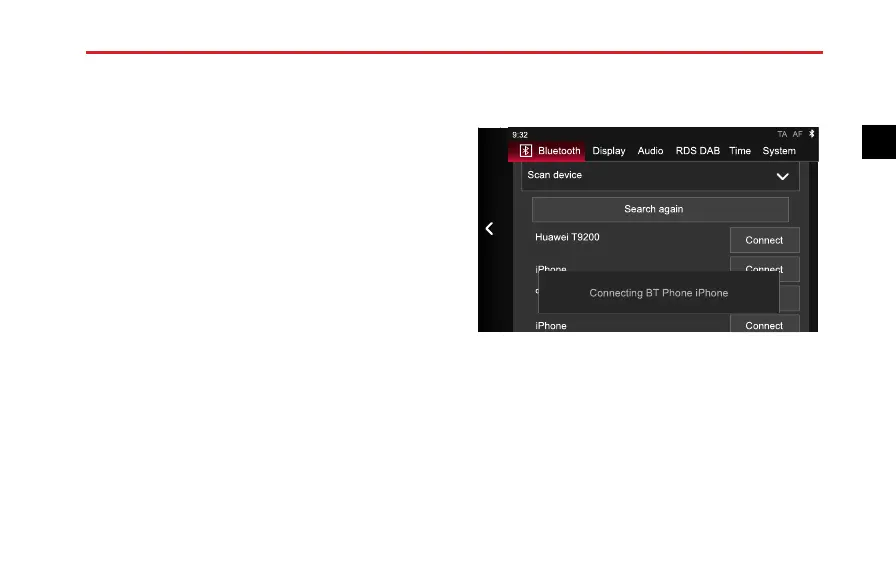
Thesystemsearchesforavailabledevicesnearbywhich
featureBluetoothtechnologyandarereadytoconnect,
afterthedevicesarefound,theyaredisplayedinthelist.
1IntheBluetoothSettinginterface,touch[Scanfor
Devices],andthentouch[Scan].
2Afterthescanningissuccessfullyperformed,the
scanneddevicenameswillappearinalist.Ifnodevice
isfoundinitially,youcantouch[ScanAgain].
3Afterthecompletionofscanning,touch[Connect]
followingthedevicename.Amessagepromptingyou
toentertheparingcodeappears.
4Usethemobilephonetoinputthepairingcodeofthe
entertainmentsystem.
Display
Scan device
Search again
Connect
ConnectiPhone
iPhone Connect
Audio RDS DAB Time System
TA AF
Connecting BT Phone iPhone
Aftertheconnectionissuccessful,amessageprompting
connectioncompletionappears.
101
2



 To Next Page