AIRCONDITIONINGANDAUDIOSYSTEMS
3Incaseofinputerror,touch ,theinputnumber
gureswillbedeletedonebyone.Longpressthe
buttontodeleteallofthegures.
4Intheprocessofenteringaphonenumber,thesystem
willmatchthenumberwithacontactintheContacts
immediately,andwillappearwhenthereisa
matchingresult.T ouchthisicontoseethematched
contacts,andtouchagaintoretractthematching
result.
5T ouch
andmakeaphonecallthroughBluetooth.
6T ouchtoendthecall.
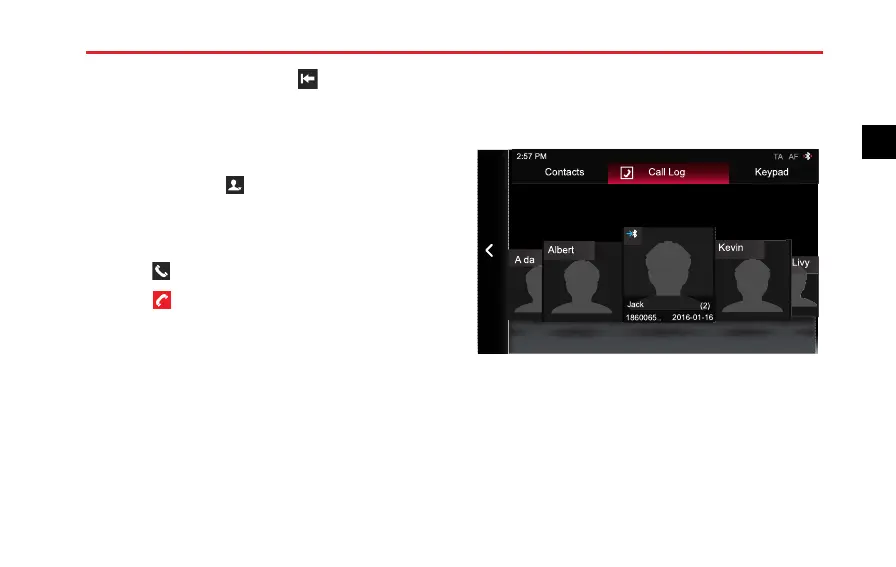
DialaNumberinCallHistory
1EntertheBluetoothPhoneinterface,andthentouch
[CallLog]toentertheCallLoginterface.
Jack
(2)
1860065..
2016-01-16
2:57 PM
Contacts Call Log
Keypad
A da
Livy
Kevin
Albert
TA AF
2T ouchthecontactnameornumberatthebottomof
thecontactphoto,youcancallthecontact.
107
2



 To Next Page