EasyManua.ls Logo

MGA CS-2015R - Page 8

Default Icon
28 pages
Print Icon
To Next Page IconTo Next Page
To Previous Page IconTo Previous Page
Loading...
REMOTE
CONTROL
TRANSMITTER
FUNCTIONS
AND
FEATURES
DESCRIPTION
AND
FUNCTIONS
1.
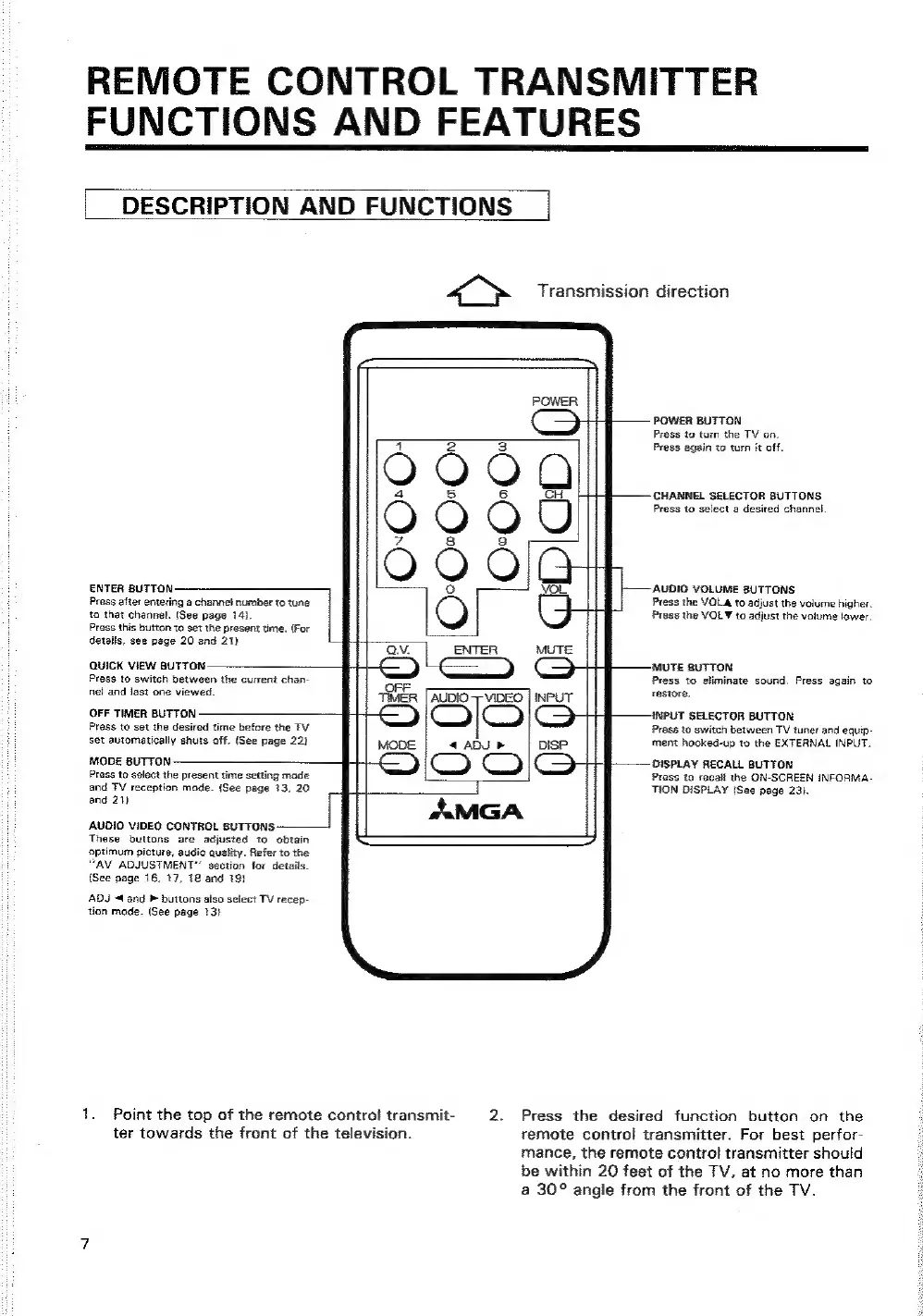
ENTER
BUTTON
Press
after
entering
a
channel
number
to
tune
to
that
channel.
(See
page
14).
Press
this
button
to
set
the
present
time.
(For
details,
see
page
20
and
21)
QUICK
VIEW
BUTTON
Press
to
switch
between
the
current
chan-
nel
and
last
one
viewed.
OFF
TIMER
BUTTON
Press
to
set
the
desired
time
before
the
TV
set
automatically
shuts
off.
(See
page
22)
MODE
BUTTON
Prass
to
select
the
present
time
setting
made
and
TV
reception
mode.
(See
page
13,
20
and
21)
AUDIO
VIDEO
CONTROL
BUTTONS
‘These
buttons
are
adjusted
to
obtain
optimum
picture,
audio
quality.
Refer
to
the
“AV
ADJUSTMENT”
section
for
detaits.
(See
page
16,
17,
18
and
191
ADJ
«(and
®
buttons
also
select
TV
recep-
tion
made.
(See
page
13}
ter
towards
the
front
of
the
television.
AUDIO
VIDEO
4
ADU
PF
=,
aMGA
Point
the
top
of
the
remote
control
transmit-
2.
POWER
BUTTON
Press
to
turn
the
TV
on.
Press
again
to
turn
it
off.
CHANNEL
SELECTOR
BUTTONS
Press
to
select
a
desired
channel.
AUDIO
VOLUME
BUTTONS
Press
the
VOL&
to
adjust
the
volume
higher.
Press
the
VOL
¥
to
adjust
the
volume
lower.
MUTE
BUTTON
Press
to
eliminate
sound.
Press
again
to
restore.
INPUT
SELECTOR
BUTTON
Press
to
switch
between
TV
tuner
and
equip-
ment
hooked-up
to
the
EXTERNAL
INPUT.
DISPLAY
RECALL
BUTTON
Press
to
recall
the
ON-SCREEN
iINFORMA-
TION
DISPLAY
(See
page
23).
Press
the
desired
function
button
on
the
remote
contro!
transmitter.
For
best
perfor-
mance,
the
remote
control
transmitter
should
be
within
20
feet
of
the
TV,
at
no
more
than
a
30°
angle
from
the
front
of
the
TV.