6
MICRO BULLET / SPRITE / FLEX / Monster BULLET
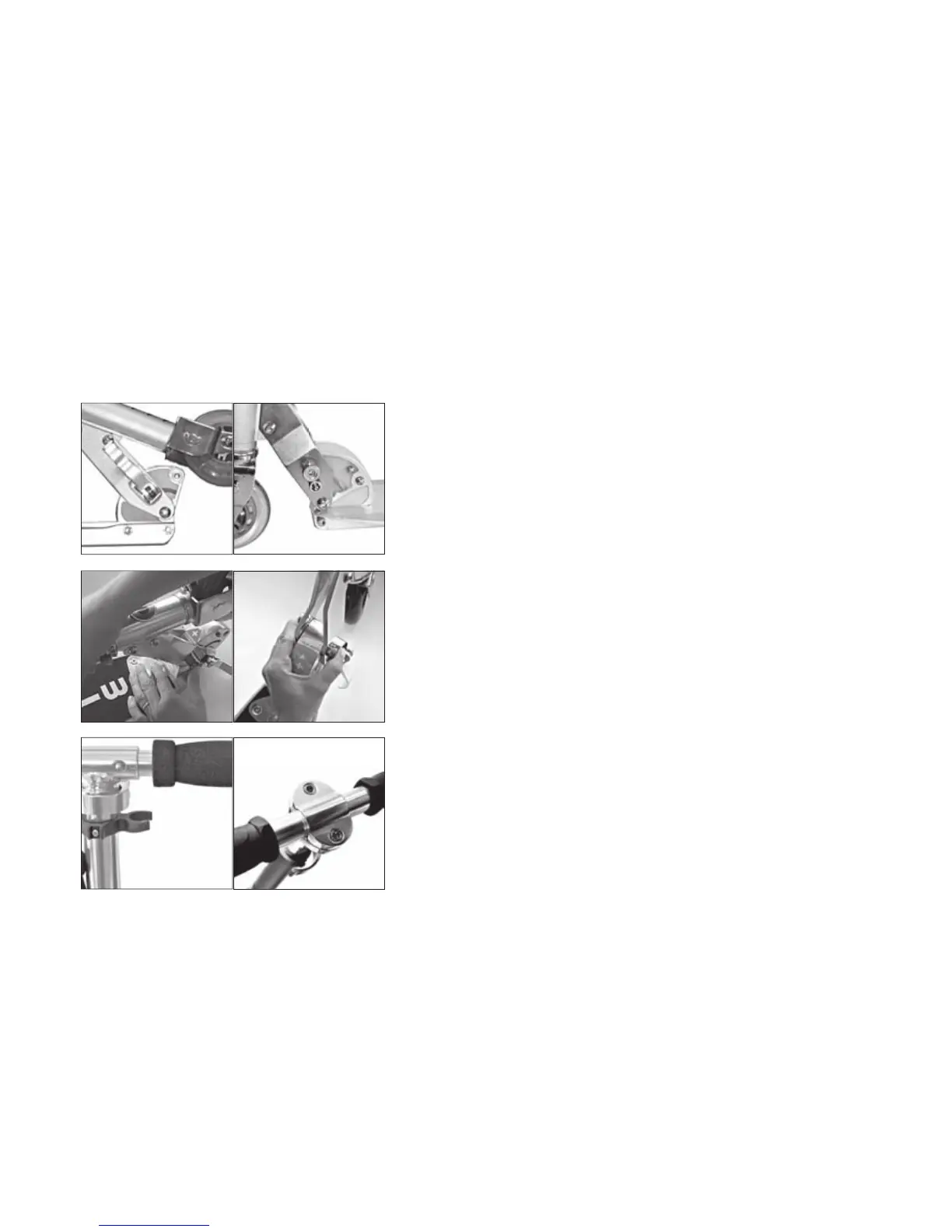
Folding an unfolding the steering column
Open damp to release tension (A). Push down locking button (B), fold up steer-
ing column and press it until it locks into position.
Securing and fi x
To secure the column tighten the knurled screw (C). Then fold up clamp (A) un-
til there is suffi cient tension and the clamp is fi rmly well and tight in position.
MICRO FLEX / FLEX AIR / FLEX 200 / Monster BULLET / SPEED+ / ROCKET
WHITE / BLACK
Unfold: press locking button (G)
Fold: press button (B) and locking button (G) at the same time.
MICRO FLEX / FLEX AIR / FLEX 200 / BULLET / Monster BULLET
SPRITE / SPEED+ / ROCKET / WHITE / BLACK
To Replace Handles:
Insert handles into the openings, align brass buttons (D), making sure both
buttons snap into holes securely.
To Remove Handles:
Press brass buttons in and pull handles engage.
MICRO LIGHT
Loosen screws (E) completely,insert and centre handlebar, position upper part
of the clamp (F) concentrically on handlebar, tighten screws (E) very fi rmly by
means of an allen key.
A
B
B
C
G
G
D
F
E


 To Next Page