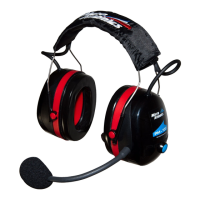
Compatibility is not a problem. Although the headsets have been specifically designed to work with each other (UL-
200 series), they will work with the UL-100 and Lynx Avionics Micro System although VOX and ANR performance
will be reduced.
Using VOX
You should take time to familiarise yourself with this feature. Please take time to learn this feature.
The microphone sponge should be skimming your lips. If the microphone is further away then you will reduce its
noise cancelling properties. This would greatly reduce the performance of the headset.
The small adjuster at the rear right hand side of the helmet, this adjusts the threshold of the VOX. If turned fully
anti-clockwise the microphone will be permanently on. Turned fully clockwise the microphone will be muted and will
not turn on until you speak loudly into the microphone.
There is an overrun set into the headsets. This means that when taking slight pauses the microphone does not
mute. Please bare this in mind when setting up the VOX mute level adjuster. The overrun is approximately one
second.
Set the Vox level once your aircraft is in the cruise. You should set the VOX level to mute your voice at the lowest
mute level. To achieve this turn the VOX adjusters so the microphone is muted ‘ OFF’. There will be no amplified
background noise (do not speak at this point). Now turn the adjuster until the microphone cuts in ‘ OPEN/ HOT
MIC’ (you will hear amplified engine noise [do not speak at this point]). STOP adjusting at this point! Now turn the
VOX dial clockwise a small amount (raising the vox level). This is the optimum level of mute. However in noisy
conditions, or open cockpit aircraft you may need to turn the VOX level up otherwise background noise will activate
the microphone. Also, when setting the VOX please bare in mind that the microphone will be active for around 1
second after speaking. Please take your time to familiarise yourself with this function. Listed below are a few
pointers to help set the VOX.
• Turn both headset VOX to max mute.
• Set one headset at a time.
• DO NOT speak whilst setting VOX level, or you WILL set the level too high.
• Set VOX level once in the cruise.
• Slowly turn the VOX adjuster until you hear background noise cut in.
• Now turn the dial clockwise (UP) a small amount. The mic will mute after 1 second.
• Make sure the mic sponge skims your lips.
• Now adjust the second headset in the same way.
• Your headset in now optimised.
Note.


 To Previous Page
 Loading...