Need help?
Do you have a question about the Micromega STAGE Series and is the answer not in the manual?
Guide to unboxing, checking connections, and powering up the player for the first time.
Detailed explanation of player buttons for playback, track selection, and display settings.
Overview of automatic standby mode and push-tray functionality for convenience.
Guidelines for proper care and cleaning to ensure player longevity and performance.
Information on how to upgrade the player's components and capabilities.
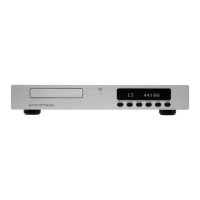
The Micromega STAGE / DRIVE is an advanced and adaptable CD player designed for high-fidelity audio reproduction. It offers a range of unique functions and features aimed at providing an intuitive and satisfying user experience.
The primary function of the Micromega STAGE / DRIVE is to play compact discs. It is designed to deliver high-quality audio output, with specific models (STAGE) offering analog output and others (DRIVE) focusing on digital output for connection to an external digital-to-analog converter (DAC). The player incorporates a modular internal architecture, allowing for easy upgrades to higher models within the range.
The STAGE / DRIVE features a user-friendly interface with several unique controls and functionalities, accessible via both the front panel and a remote control handset.
OPEN/CLOSE (Key 1): This button controls the disc tray. A single press opens or closes the tray. If the player is in "auto off" mode, pressing this button will light up the display and open the tray. In "display off" and "play" mode, it will light up the display. In "display off" and "stop" mode, it will reactivate the display and open the tray. The player also supports a "push-tray" function, where gently pushing the tray in will close it and start playing the disc.
TIME (Key 2): This function allows the user to cycle through three different time display modes:
BRIGHTNESS (Key 3): This control offers three levels of display brightness: high, low, and off. In high or low settings, the Micromega logo and model number are displayed. When in "off" mode, a small red horizontal bar indicates that the player is in "display off" rather than "auto off."
HEADPHONES: When headphones are plugged into the jack socket, the brightness control doubles as the headphone volume control. An appropriate logo is displayed, and the STAGE model number is replaced by a zero, indicating the headphone level. Each press of the brightness control increases the volume up to a maximum level of 9. Continuous pressure on the brightness control reduces the volume. The player remembers the last headphone volume setting, which is automatically restored when headphones are next plugged in, unless the player is unplugged from the mains or experiences a power failure. It's important to note that plugging in headphones does not disconnect the main audio output, although the headphone volume setting does affect the overall output volume. The nominal output level of 2V is achieved at setting 9.
DOUBLE SPEED (Key 4): This unique feature allows discs to be replayed at precisely twice the normal speed. This can be particularly useful for cutting recording time in half when used with cassette players equipped with double-speed duplication facilities. A single press activates double-speed mode. When in play mode, the play symbol blinks; when in stop mode, the word "time" blinks.
REVERSE MODE (Key 5): A single press selects the previous track. Continuous pressure activates Fast Reverse Scan, which operates at two speeds. For the first three seconds, the audio output is muted by 12dB, allowing for a focused search within a track. After three seconds, the output is completely muted for a high-speed search.
FORWARD MODE (Key 6): Similar to Reverse Mode, a single press selects the next track. Continuous pressure activates Fast Forward Scan, with the same operational technique as in reverse mode.
PLAY (Key 7): Pressing this button once starts the disc. If the tray is open, one touch will close the tray and start the disc. If the machine is already playing, one touch will replay the current track. If the machine is in Pause mode, one depression of the key will return to the beginning of the selected track, but in pause mode.
STOP/PAUSE/CLEAR (Key 8): A single press moves the machine into and out of pause. Continuous pressure activates the Stop function. A single press while in stop mode will clear any program information. These functions are duplicated on the remote control, which offers additional flexibility for features like track programming, random play, and repeat play. It's important to remember that when in Pause mode, the laser remains active, operating as if it were still playing the disc, which impacts the overall life of the laser.
Auto Standby: All STAGE and DRIVE players are equipped with auto Standby. The player does not have a physical on/off switch. Upon connecting the player to the mains supply, it automatically enters a stand-by mode. Pressing any keyboard or handset key then moves the player into full operational mode, lighting up all legends. If the player is not used for a period exceeding ten minutes, it automatically switches back into Auto Standby. This ensures that all audio circuits are kept at optimum temperature, guaranteeing greater longevity and sonic performance. If the tray is opened and the unit is not used for ten minutes, the tray will automatically close, and the player will enter auto-standby mode.
The Micromega STAGE / DRIVE is robustly built, but proper care is essential to ensure its longevity and continued performance.
Cleaning: The casework should not be cleaned with abrasive materials. Polishes containing silicone should be avoided as they can adversely affect electrical contacts. It is permissible to use proprietary foam cleaners sparingly, but the recommended method is to breathe on the machine and then gently wipe it with a soft, lint-free cloth. Solvents must never be used.
Internal Access: Users should never open the casing of the player. Opening the unit can cause expensive damage to the device and can also be dangerous due to lethal electricity. Any necessary repairs or internal work should only be performed by an authorized Micromega dealer.
Upgrades: The modular internal architecture of the STAGE / DRIVE makes upgrades easy and, in most cases, without cost penalty. Upgrades should always be carried out by an authorized Micromega dealer, who will also issue the necessary paperwork to authenticate and register the upgrade guarantee. This design eliminates the need for trade-ins or disposing of second-hand players when upgrading.
Digital Output: The co-axial, ACUTRANS-equipped digital output is provided solely for connection to an outboard digital-to-analog converter. For further details on this, users should contact their authorized Micromega dealer.
Packing: It is good practice to preserve all original packing materials. In the unlikely event that the player needs to be sent back for service, it must be sent in the original materials to avoid invalidating the warranty. The original carton and contents should be placed in an outer plastic bag and stored in a safe, dry place.
 General
| Type | CD Player |
|---|---|
| Series | STAGE |
| Disc Compatibility | CD, CD-R, CD-RW |
| Signal-to-Noise Ratio | > 100 dB |
| DAC | 24-bit/192kHz |
| Digital Output | Coaxial |
| Analog Output | RCA |
| Total Harmonic Distortion | < 0.005% (1 kHz) |

 To Next Page