Need help?
Do you have a question about the MicroNX new NX-201N and is the answer not in the manual?
Product must be used only under rated power specifications; avoid exceeding the specified range.
Use only with manufacturer's accessories, do not use oil for cleaning, avoid impact, use ISO standard burs, operate buttons gently.
Keep workplace clean, work in safe/dry place, check power cords, avoid flammables, keep away from children/elderly, use safety gear, check power off before connecting, stop before changing bur.
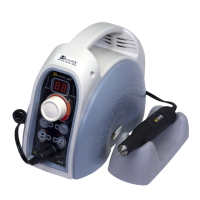
Lists system components like Controller, Handpiece, Foot switch, Holder, Chuck wrench, Carbon brush with quantities and diagram.
Details the Handpiece (NX-170S) and Foot switch (FS-30), including parts and specifications.
Lists accessories (Holder, Chuck wrench, Carbon brush) and controller performance specs (Input, Weight, Dimension).
Provides Handpiece performance specs (Max. Speed, Weight, Dimension) and storage conditions (Temperature, Humidity, Air pressure).
Instructions for connecting the controller and handpiece, including identifying holes and inserting pins. Includes a caution to turn off power.
Instructions for connecting the foot switch to the controller, checking for damage, and inserting the jack. Includes a caution to turn off power.
Checks before operating: power off, correct voltage, speed dial at MIN, bur locked, turn on power while holding handpiece.
How to adjust speed using the dial, clockwise for increase, counter-clockwise for decrease.
How to set rotational direction (FOR/REV) using the button when the motor is not running.
How to change modes (Hand/Foot) by setting speed to 0 and using the Hand/Foot button. Includes a caution to turn off power.
Step-by-step guide on how to replace a bur by turning the handle to loosen and tighten the chuck.
Instructions on how to disassemble and reassemble the handpiece to replace the collet chuck using wrenches. Includes notice on lifespan.
Detailed steps for replacing the carbon brush, including removing the old brush and installing a new one, with notice on replacement frequency.
Steps for replacing the ball bearing by disassembling and reassembling parts, including removing and inserting the 'C' ring. Includes notice to check under idle.
Details common problems, check points, and solutions for issues like power lamp not lighting, motor not working, foot pedal not working, and handpiece noise.
Lists and shows images of expendable parts such as spindle assembly, armature assembly, collet chuck housing, collet chuck, carbon brush, ball bearing.
Provides manufacturer contact information (MICRO-NX Co., Ltd.) and EU representative details.
Details the warranty period (1 year) and conditions for paid service due to user misuse.
 General
| Brand | MicroNX |
|---|---|
| Model | new NX-201N |
| Category | Dental equipment |
| Language | English |

 To Next Page