Status Light Indications
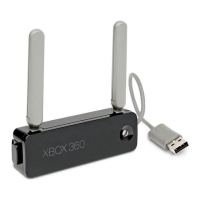
The status light on the Xbox 360
Wireless Networking Adapter
indicates the following:
• Greensteady:Adapterisonand
connected to a wireless access
point (infrastructure) or another
wireless device (ad-hoc).
• Greenblinking:Adapterispowered
but not connected, or is connecting
to another wireless device.
• Redsteady:Hardwarenot
recognized.
• Redblinking:Driverorhardware
problem.
• Off:Nopower.
NOTE
For ad-hoc networks, the connection
will not be indicated by a green
steady light until two consoles have
joined the network.
IF YOU NEED MORE HELP
Gotowww.xbox.com/supportorcall
Xbox Customer Support:
• UnitedStatesandCanada:
1-800-4MY-XBOX(1-800-469-9269)
TTYusers:1-866-740-XBOX
(1-866-740-9269)
• Mexico:001-866-745-83-12
(TTYusers:001-866-251-26-21)
• Colombia:01-800-912-1830
• Brazil:0800-891-9835
• Chile:1230-020-6001
Do not take your Xbox 360 console
or its accessories to your retailer for
repair or service unless instructed to
do so by an Xbox Customer Support
representative.
Do Not Attempt Repairs
Do not attempt to take apart,
service, or modify the Xbox 360
console, power supply, or its
accessories in any way. Doing so
could present the risk of serious
injury or death from electric
shockorre,anditwillvoidyour
warranty.


 To Next Page