Standard
Connection
speed
Frequency
band
802.11a Faster 5GHz
802.11b Fast 2.4GHz
802.11g Faster 2.4GHz
802.11n Fastest
2.4GHz/5GHz
When selecting your wireless network,
keep a few guidelines in mind:
1 The5-GHzstandards(802.11aand
802.11n)arelesssusceptibleto
interference from common devices
suchas2.4-GHzcordless
telephones, cell phones, and
microwave ovens. Also, because of
thepopularityof2.4-GHznetworks,
a5-GHznetworkislesslikelyto
experience interference from
neighboring wireless networks.
2 An802.11nnetworkiscompatible
withallfour802.11standards,and
an802.11gnetworkiscompatible
withboth802.11gand802.11b
devices.However,any802.11b
devices operating on your
802.11n/gnetworkwillslowit
down. If you have a dual-band
(2.4-GHzand5-GHz)accesspoint
or router, try operating your
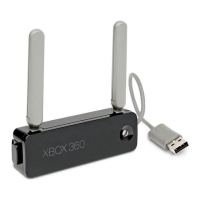
console and wireless networking
adapterinthe5-GHzband(802.11a
or802.11n)andyourotherdevices
inthe2.4-GHzband(802.11band
802.11g).TheXbox360consolein
thiscongurationwillhavethe
maximum bandwidth, while
remaining networked with other
devices.
3 If you use wireless controllers,
you may get better performance
usingthe5-GHzbandforyour
network connection, since the
wireless controllers operate in
the2.4-GHzband.


 To Next Page