2
F.
℃ / ℉ OFF KEY------temperature unit switch/power off key: under temperature
mode, press the key to
s
elect temperature unit as ℃ or ℉ ( original temperature
unit : ℃ ). Keep pressing the key for about 3 seconds to power off.
G. PROTECTING BUSHING --- Please take the protecting bushing away when using
the test probe. Put on the protecting bushing when it
is
not in use to protect the test
probe.
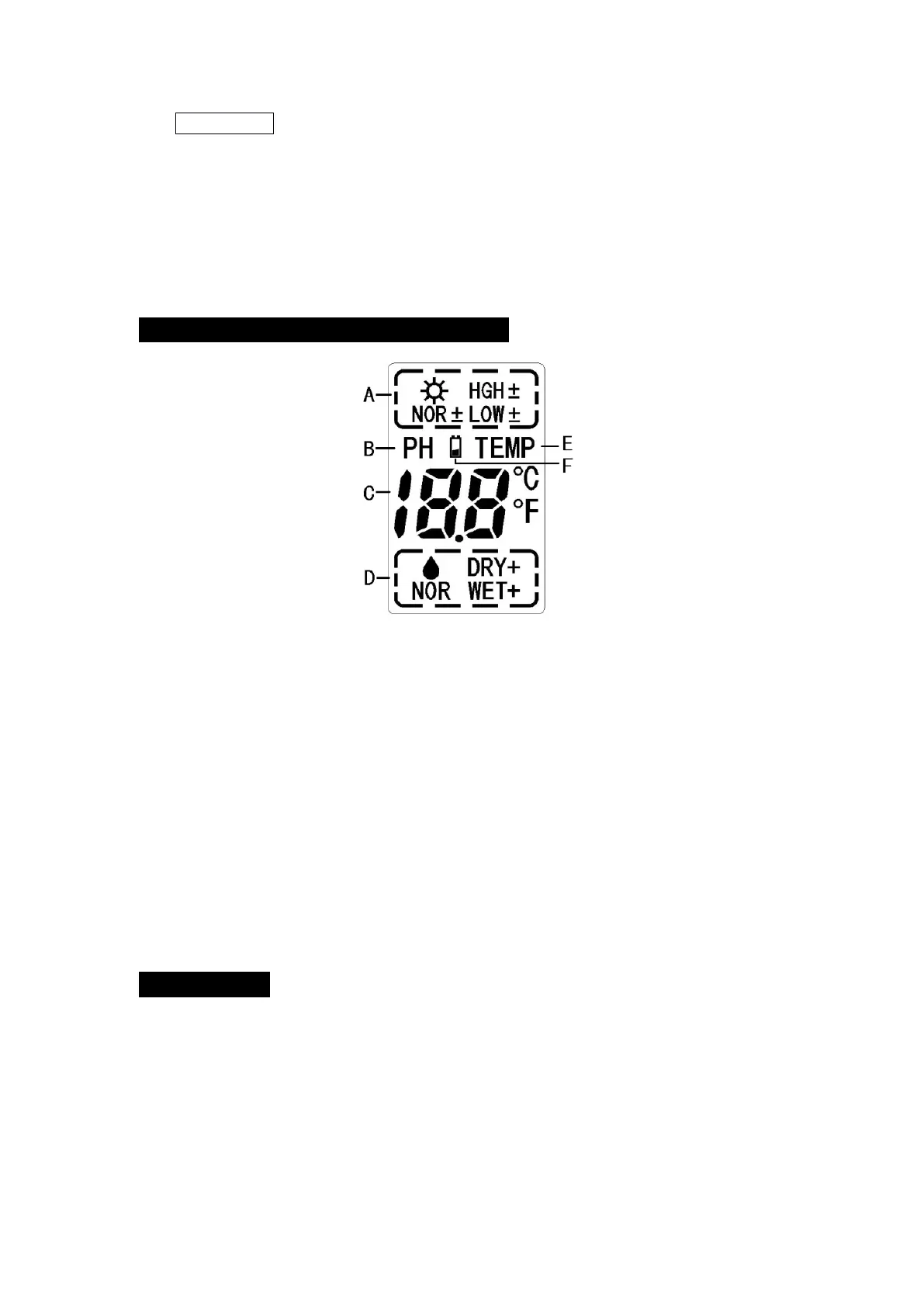
ILLUSTRATION OF DISPLAY SCREEN
A. Sunlight intensity display area------9 levels: LOW- 、 LOW 、 LOW+ 、 NOR- 、 NOR
、
NOR+ 、 HGH- 、 HGH 、 HGH+ , each increasing in amount and quality. LOW-
signifies an extremely dim environment. HGH+ signifies an extremely bright
environment.
B. PH function display
C. PH or temperature value display------It shows 3.5 to 9.0 for PH value and -9 ℃ to
+50 ℃ (16 ℉ to 122 ℉ ) for temperature. “ Lo ” or “ HH ” indicates the value
is
out of
the measurable range.
D. Moisture display area------5 levels: DRY+ 、 DRY 、 NOR 、 WET 、 WET+ , each
increasing
in
wetness. WET+ signifies an extremely wet environment while DRY+
signifies an extremely dry environment.
E. Temperature function display.
F.
Low battery display------The symbol will display on the LCD continuously when the
battery is low.
HOW TO USE
Please install one 9 volt battery before use.
● BATTERY INSTALLATION
Open the battery compartment door on the back of the tool and plug one 9 volt
block battery onto the battery connector. Put the battery back to the compartment and
close the door.
● OPERATION GUIDE


 To Next Page
 Loading...