EasyManua.ls Logo

Mifold Hifold - How to Adjust Hifold; Adjusting Body Width; Adjusting Seat Width; Adjusting Head Width

Mifold Hifold
12 pages
Print Icon
To Next Page IconTo Next Page
To Previous Page IconTo Previous Page
Loading...
the fit-and-fold booster
TM
7KHZRUOGŚV
most adjustable
highback
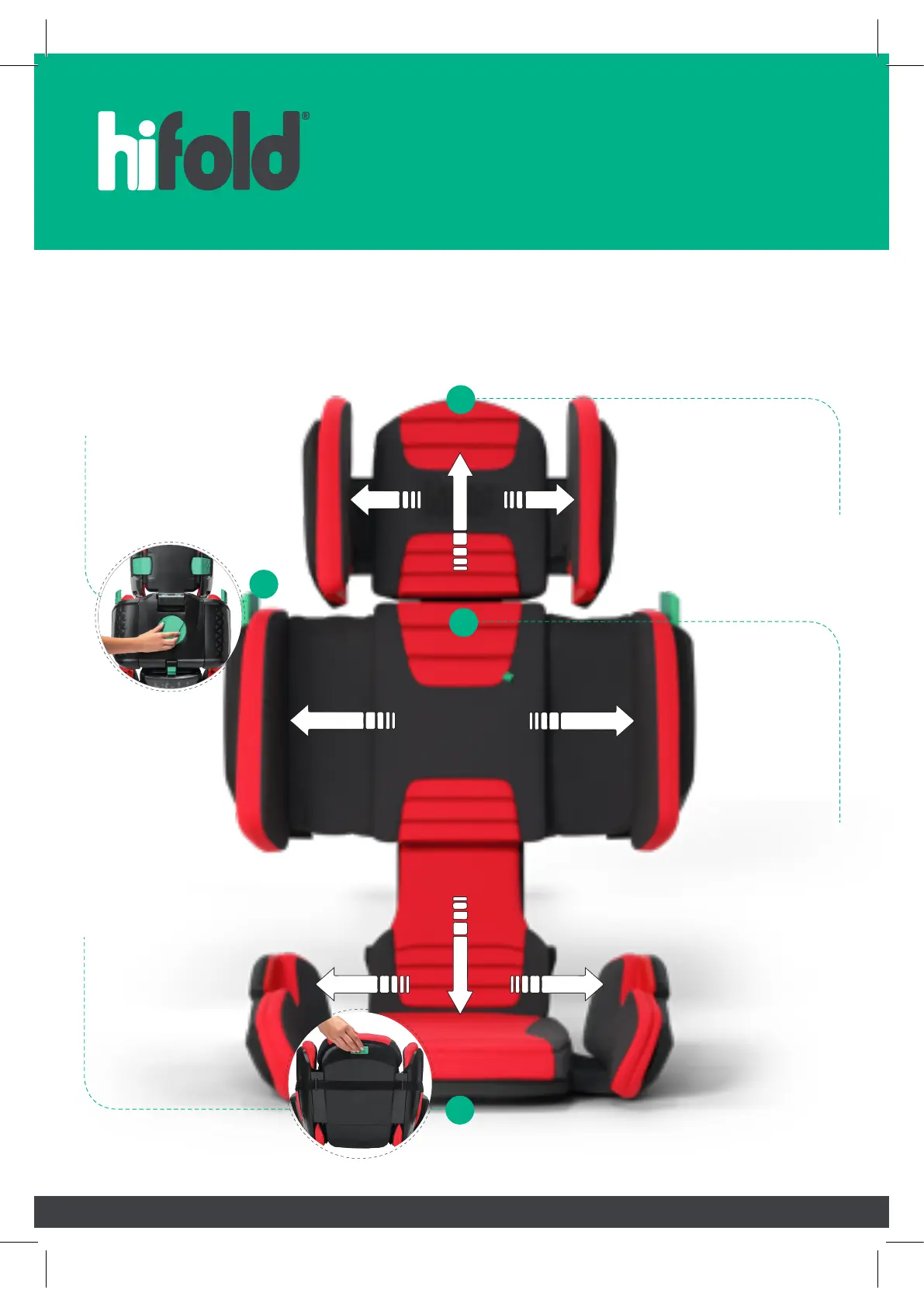
how to adjust hifold
®
Adjust the sides by
depressing the lock
behind the seat
and rotating the knob
to the desired width.
1. body width
Pull on the green
tab underneath the
front of the seat
whilst
simultaneously
pulling out the
sides to the
desired width.
2. seat width
4.
height settings
Adjust the
height with the
green lever
under the cover.
Lift the lever to
raise or lower
the back height.
Use other hand
to keep seat
stable.
3. head width
Push down the green
button and simultaneously
pull out the headrest to
the desired width.
3
2
4
1

Related product manuals