Page 5 of 9 rev 100321 Millennia Media NSEQ
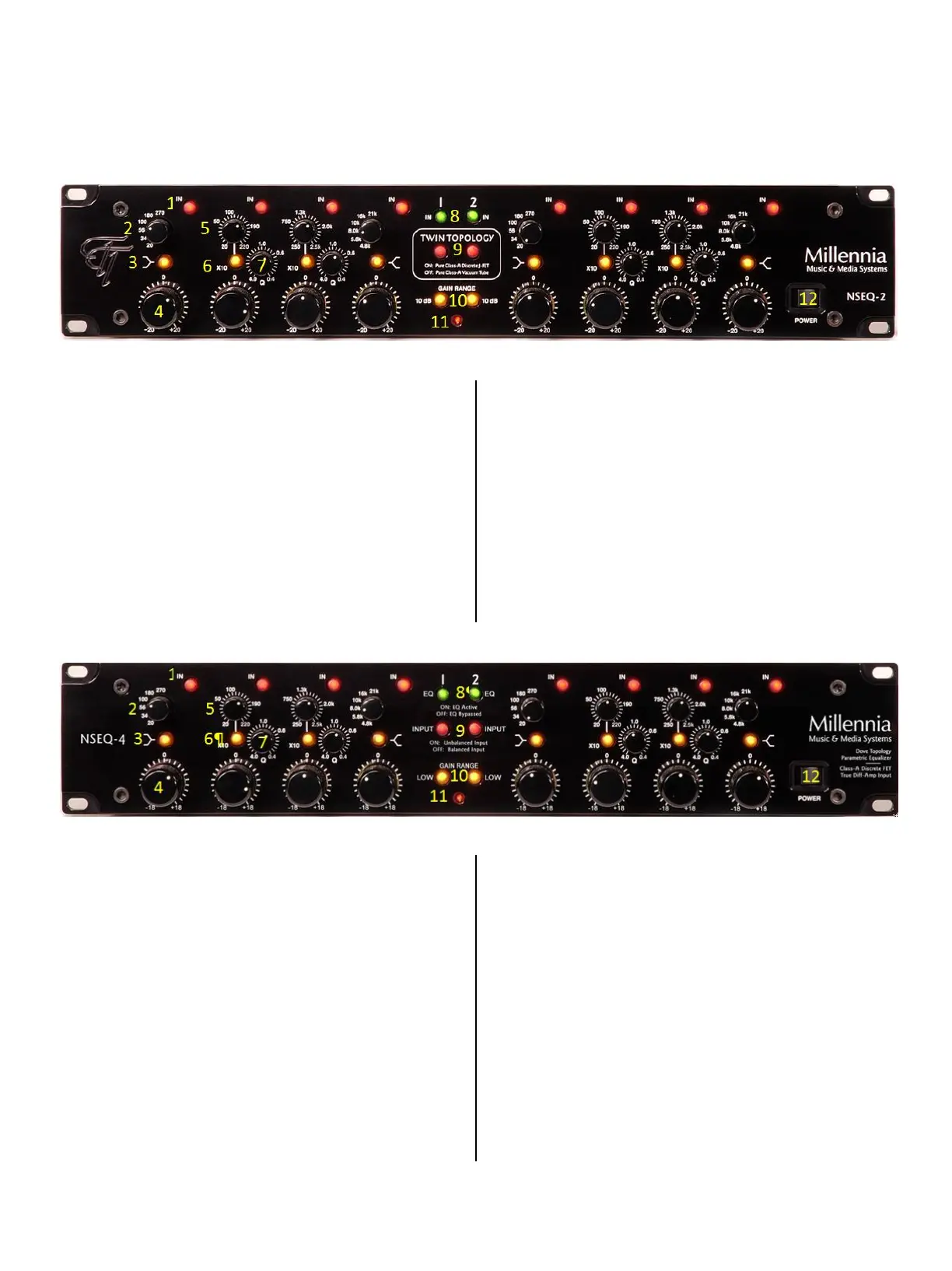
NSEQ Controls
NSEQ-2 Front Panel
1. Band In/Out Switch "IN" — places its associated
EQ band in circuit or out of circuit
2. Frequency Select Switch — selects fixed high and
low band frequencies
3. Peak/Shelf Select — When LED is on, EQ is
shelving at 6 dB per octave. When LED is off, EQ is
peaking with a fixed "Q" of 1.0.
4. Boost/Cut Control — +18 dB of boost and -18 dB
of cut. Boost/Cut potentiometer has 21 detented
positions for accurate repeatability and session log-
ging.
5. Parametric Frequency Control – selects EQ center
frequency.
6. Parametric Frequency Range Select Switch
"10X" —When LED is on, frequencies as shown on
front panel legend are multiplied by 10X. When LED
is off, frequencies are as shown on front panel
legend.
7. Parametric Q Control – EQ bandwidth.
8. Master Equalizer In/Out Select Switch — "EQ
IN" places EQ in the signal path. Hardwired relay
bypass when out.
9. Twin Topology — Select J-FET (LED illuminated) or
Vacuum Tube circuitry.
10. Gain Range — +/- 18dB or +/- 9dB
11. Power Indicator — when illuminated shows the
NSEQ-2 is powered up and active.
12. Power Switch — turns power on and off.
NSEQ-4 Front Panel
1. Band In/Out Switch "IN" — places its associated
EQ band in circuit or out of circuit
2. Frequency Select Switch — selects fixed high and
low band frequencies
3. Peak/Shelf Select — When LED is on, EQ is
shelving at 6 dB per octave. When LED is off, EQ is
peaking with a fixed "Q" of 1.0.
4. Boost/Cut Control — +18 dB of boost and -18 dB
of cut. Boost/Cut potentiometer has 21 detented
positions for accurate repeatability and session log-
ging.
5. Parametric Frequency Control – selects EQ center
frequency.
6. Parametric Frequency Range Select Switch
"10X" —When LED is on, frequencies as shown on
front panel legend are multiplied by 10X. When LED
is off, frequencies are as shown on front panel
legend.
7. Parametric Q Control – EQ bandwidth.
8. Master Equalizer In/Out Select Switch — "EQ
IN" places EQ in the signal path. Hardwired relay
bypass when out.
9. Balanced/Unbalanced Input— Unbalanced
increases gain by 6dB to compensate for possible
signal loss when balanced and unbalanced
equipment is used in the same signal path.
10. Gain Range — +/- 18dB or +/- 9dB
11. Power Indicator — when illuminated shows the
NSEQ-4 is powered up and active.
12. Power Switch — turns power on and off.


 To Next Page
 Loading...