CALIBRATION:
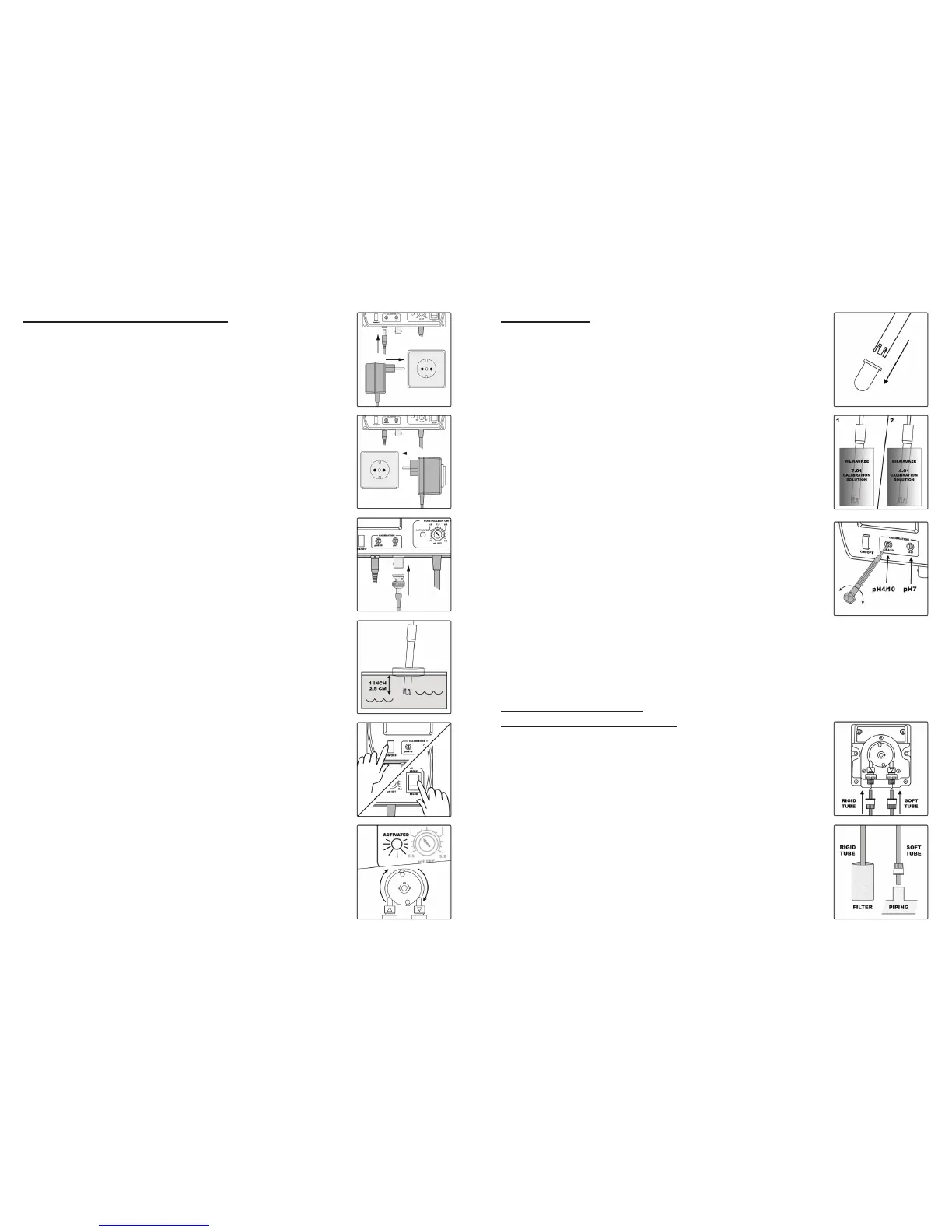
• Remove the protective cap from the electrode.
• Immerse the electrode tip into a new sachet of pH 7 calibration
solution and allow the reading to stabilize.
• Adjust the pH7 calibration trimmer (on the front) to display “7.0
pH”.
• Rinse the electrode with tap water and dry it with paper tissue.
• Open a new sachet of pH 4 calibration solution, immerse the
electrode tip into the sachet and allow the reading to stabilize.
• Adjust the pH4/10 calibration trimmer (on the front) to display
“4.0 pH”.
The calibration is now complete and the meter is ready to take
measurements.
It is suggested to recalibrate the meter at least once a month,
after a prolonged stocking time and after pH-electrode
replacement.
INSTALLATION OF THE
MP810 1,5 L/H DOSING PUMP
Connect the rigid tube to the pump (aspiration – arrow upwards).
Fix the white lter on the other end of the tube, where the dis-
solved pH reducing acid will be drawn in – to prevent small ob-
jects entering the pump.
Connect the soft tube to the pump (impulsion – arrow down-
wards). The injection tting will be placed at the end of this tube
only to inject into a piping. (This tting has a thread that links it
to the piping.)
INSTALLATION OF CONTROLLER:
Connect the supplied 240VAC/12VDC power adapter to the
meter and to the main line.
Connect the connection base (black and white outlet) to the
main line.
Connect the pH-electrode to the BNC socket on the bottom of
the meter.
Always remove the electrode protective cap before taking any
measurement. Make sure that the meter has been calibrated
before taking any measurements
Immerse the tip (2.5 cm) of the pH-electrode into the sample.
(for example it can oat with the help of a piece of polystyrol).
Turn the instrument on by pressing the ON/OFF button.
The nature of the setpoint can be selected by setting the switch
to the desired position (ABOVE or BELOW).
Allow the reading to stabilize and the meter will start continuous
monitoring.
A blinking alarm will indicate when the measured pH value is
higher or lower than selected setpoint, depending on user
selection. When the alarm is activated, it also activates the
connection base and the auxiliary equipment.
The setpoint can be selected by adjusting the central front knob
to the desired value. The selectable range is from 5.5 to 9.5 pH.


 To Previous Page
 Loading...