QUICK USER GUIDE
Starter Guide
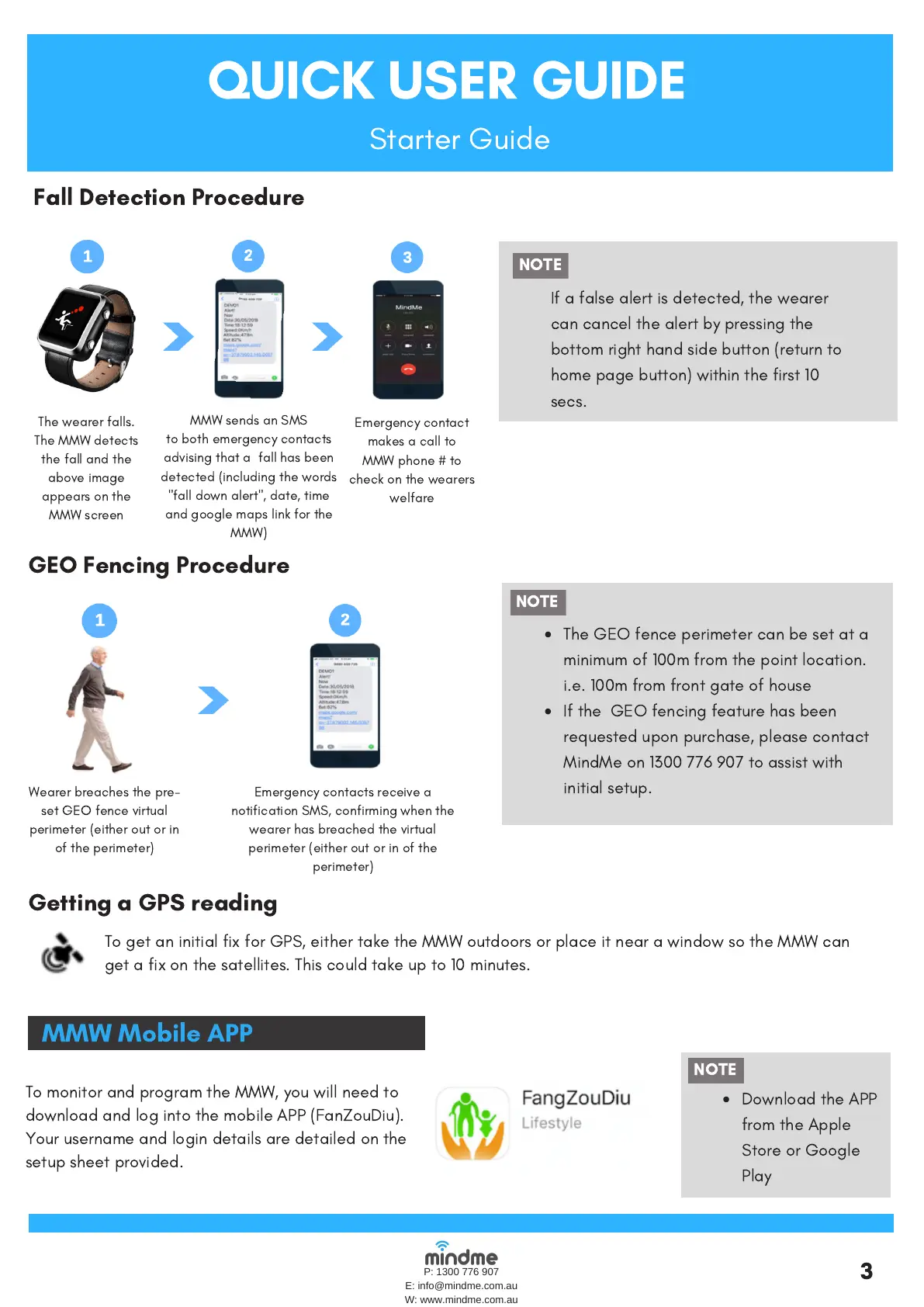
GEO Fencing Procedure
Wearerbreaches thepre-
set GEO fence virtual
perimeter(eitherout or in
of the perimeter)
Emergency contacts receive a
notification SMS, confirming when the
wearer has breached the virtual
perimeter (either out or in of the
perimeter)
The GEO fenceperimeter can be set at a
minimum of 100m from the point location.
i.e. 100m from front gate of house
If the GEO fencing feature has been
requested upon purchase, please contact
MindMe on 1300 776 907 to assist with
initial setup.
NOTE
NOTE
P: 1300 776 907
E: info@mindme.com.au
W: www.mindme.com.au
Fall Detection Procedure
The wearer falls.
The MMW detects
the fall and the
above image
appears on the
MMW screen
MMW sends an SMS
tobothemergency contacts
advising that a fall has been
detected(including the words
"fall down alert", date, time
and google maps link for the
MMW)
Emergency contact
makesacall to
MMWphone# to
check onthe wearers
welfare
NOTE
If a false alert is detected, the wearer
can cancel the alert by pressing the
bottom right hand side button (return to
home page button) within the first 10
secs.
3
MMW Mobile APP
To monitor and program the MMW, you will need to
download and log into the mobile APP (FanZouDiu).
Your username and login details are detailed on the
setup sheet provided.
Download the APP
from the Apple
Store or Google
Play
NOTE
Getting a GPS reading
To get an initial fix for GPS,either take the MMW outdoors or place it near a window so the MMW can
get a fix on the satellites. This could take up to 10 minutes.


 To Next Page
 Loading...