
 Need help?
Do you have a question about the MindPlace Procyon AVS and is the answer not in the manual?
Essential warnings and guidance before operating the Procyon for safe and effective use.
Explores the potential of Procyon for creating consciousness-altering art.
Discusses the profound effect of colors on cognition, perception, mood, and mental states.
Sessions designed to induce relaxation using calming colors like blue and green.
Gentle, slow sessions focused on blue and green light to clear the mind before sleep.
Sessions based on superlearning paradigms to induce a hypnagogic state for learning.
Sessions using rainbow colors and frequencies for mental activation and peak performance.
Active sessions with rapid pattern shifts for preparing mind and body for activities.
Sessions showcasing aesthetic aspects, inducing complex imagery for altered states.
Describes the advanced surface-mounted optoelectronic emitters for millions of colors.
Allows creation of pure, non-flickering color fields for meditation or color exploration.
Enables assigning brightness and frequency to each color channel for complex effects.
Details the capacity for over 1500 segments stored in internal flash memory.
Facilitates session transfer, OS updates, and PC control.
Offers low-noise, CD-quality audio for mixing and precise control.
Generates binaural beats synchronized with color channel frequencies.
Synchronizes audio content from CDs with internally stored sessions in full color.
Instructions for installing three "AA" alkaline batteries for standalone operation.
Guidance on connecting the GanzFrames display and stereo headphones to the console.
Steps to turn on the unit, select sessions, adjust volume/brightness, and stop sessions.
Tips for creating an ideal session environment, including posture and ambient light.
Explains the function of the mode buttons, audio/light dials, and various input/output connectors.
A serial data protocol for controlling parameters via biofeedback equipment.
A waveform limited to its maximum allowed amplitude.
Defines a single color (red, green, blue) and its associated parameters.
Controls the mix of steady (ganzfeld) light with flickering light.
Nonvolatile memory used for operating system and data storage.
The rate of waveform cycles per second, measured in Hertz.
A field of light that glows steadily, without flickering.
Measure of oscillations per second, equivalent to cycles per second.
The relationship between two or more waveforms' start times.
The degree to which two waveforms are out of phase with each other.
Any aspect of a session that can be altered, like waveform or brightness.
Measures the duration a light remains on within a waveform cycle.
The change of pulse width over the course of a segment.
The basic unit of structure for a session, with variable length and parameters.
A sequence of segments forming a complete audio-visual experience.
A series of numbers representing visual or audio waveforms.
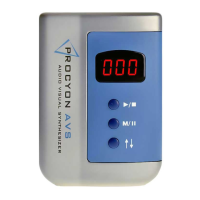
Summarizes the Procyon's unique features, including visual effects engine and audio codec.
 General
| Category | Synthesizer |
|---|---|
| Connectivity | USB |
| Light Output | LED |
| Audio Channels | 2 |
| Sound Output | Stereo |
| External Inputs | Stereo audio |
| Power Source | Battery or AC adapter |
| Compatibility | PC/Mac via USB |
| Device Type | MindPlace Procyon AVS |

 To Next Page