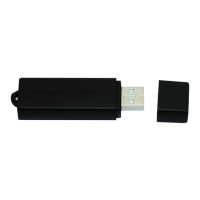
*
OPERATING THE 25-DAY STANDBY VOICE RECORDER
IMPORTANT NOTICE: Allow the device to charge 4 – 6 hours before
using.
HOW TO CHARGE THE VOICE RECORDER
1. Remove the cap
2. Insert the USB stick into your PC’s USB jack
• The red indicator light will be solid while charging
• The red indicator light will blink when fully charged
HOW TO CHECK THE REMAINING BATTERY LIFE
1. Eject the USB stick from your PC’s USB jack
• The indicator light will display one of three ways
i. 0%–30% light off
ii. 30%–70% light blink
iii. 70%–100% light on
HOW TO RECORD
1. Turn the Recording Switch into the continuous recording
position (see Figure 4)
• After approx. 3 seconds, the red indicator light will
blink
• The device is now recording
2. Turn the Recording Switch into the stop position (see Figure 3)
• The device has stopped recording and saved the file
HOW TO USE VOICE OPERATED RECORDING
1. Turn the Recording Switch into the voice operated recording
position (see Figure 5)
• After approx. 3 seconds, the red indicator light will
blink
• The device is now recording
2. Turn the Recording Switch into the stop position (see Figure 3)
• The device has stopped recording and saved the file
HOW TO USE LONG RECORDING
Long play is used while the device is plugged into your PC, allowing
you to record for a long time
1. Turn the Recording Switch into the voice operated recording
position (see Figure 5)
• After approx. 3 seconds, the red indicator light will
blink
• The device is now recording
2. Plug the USB stick into your PC’s USB jack
3. Turn the Recording Switch into the stop position (see Figure 3)
• The device has stopped recording and saved the file
IMPORTANT NOTICE
This device is not equipped to have its time stamp adjusted. We
have attempted extensive testing, but unfortunately none of our
known methods have worked. We apologize for any inconvenience
this might cause.


 To Next Page