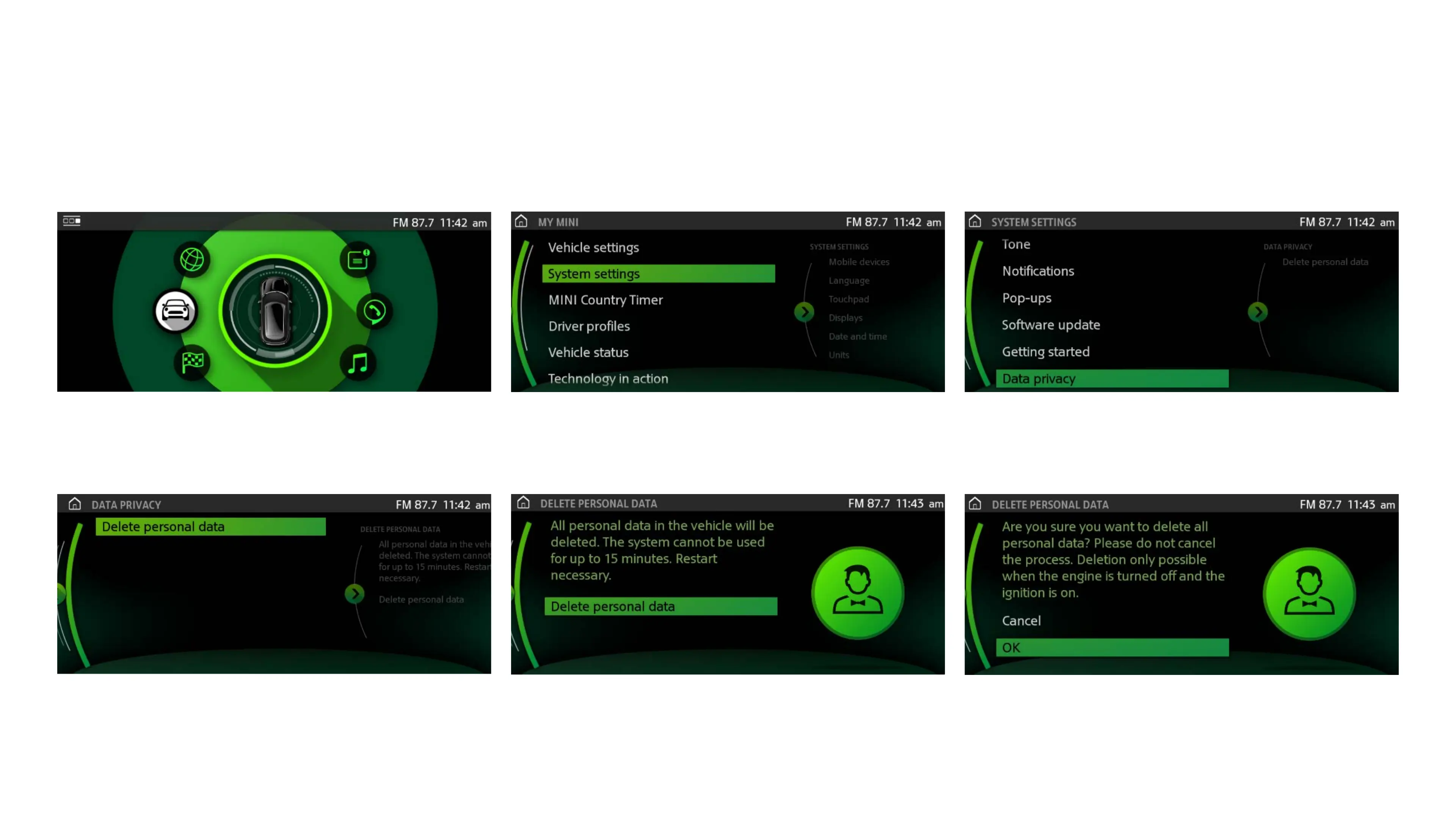
To delete personal data in vehicles equipped with MINI iDrive 5, please follow these steps:
1. From the main menu, select MY MINI. 2. Select SYSTEM SETTINGS. 3. Select DATA PRIVACY.
4. Select DELETE PERSONAL DATA. 5. Click on DELETE PERSONAL DATA to proceed. 6. The system will require final confirmation.
Select OK to confirm and delete personal data.
DELETION OF PERSONAL DATA
Removing stored data from MINI iDrive version 5.
To delete personal data in vehicles equipped with MINI iDrive 5, please follow these steps:
1. From the main menu, select MY MINI. 2. Select SYSTEM SETTINGS. 3. Select DATA PRIVACY.
4. Select DELETE PERSONAL DATA. 5. Click on DELETE PERSONAL DATA to proceed. 6. The system will require final confirmation.
Select OK to confirm and delete personal data.
DELETION OF PERSONAL DATA
Removing stored data from MINI iDrive version 5.
To delete personal data in vehicles equipped with MINI iDrive 5, please follow these steps:
1. From the main menu, select MY MINI. 2. Select SYSTEM SETTINGS. 3. Select DATA PRIVACY.
4. Select DELETE PERSONAL DATA. 5. Click on DELETE PERSONAL DATA to proceed. 6. The system will require final confirmation.
Select OK to confirm and delete personal data.
DELETION OF PERSONAL DATA
Removing stored data from MINI iDrive version 5.
To delete personal data in vehicles equipped with MINI iDrive 5, please follow these steps:
1. From the main menu, select MY MINI. 2. Select SYSTEM SETTINGS. 3. Select DATA PRIVACY.
4. Select DELETE PERSONAL DATA. 5. Click on DELETE PERSONAL DATA to proceed. 6. The system will require final confirmation.
Select OK to confirm and delete personal data.
DELETION OF PERSONAL DATA
Removing stored data from MINI iDrive version 5.
To delete personal data in vehicles equipped with MINI iDrive 5, please follow these steps:
1. From the main menu, select MY MINI. 2. Select SYSTEM SETTINGS. 3. Select DATA PRIVACY.
4. Select DELETE PERSONAL DATA. 5. Click on DELETE PERSONAL DATA to proceed. 6. The system will require final confirmation.
Select OK to confirm and delete personal data.
DELETION OF PERSONAL DATA
Removing stored data from MINI iDrive version 5.
To delete personal data in vehicles equipped with MINI iDrive 5, please follow these steps:
1. From the main menu, select MY MINI. 2. Select SYSTEM SETTINGS. 3. Select DATA PRIVACY.
4. Select DELETE PERSONAL DATA. 5. Click on DELETE PERSONAL DATA to proceed. 6. The system will require final confirmation.
Select OK to confirm and delete personal data.
DELETION OF PERSONAL DATA
Removing stored data from MINI iDrive version 5.
1 From the main menu, select MY MINI.
4 Then, select DELETE PERSONAL DATA.
2 Select SYSTEM SETTINGS.
5 Click on DELETE PERSONAL DATA to proceed.
3 Select DATA PRIVACY.
6 The system will require final confirmation.
Select OK to confirm.
To delete personal data in vehicles equipped with MINI iDrive 5, please follow these steps.
REMOVING STORED DATA FROM MINI iDRIVE VERSION 5.


 To Next Page
 Loading...