EasyManua.ls Logo

MINIWARE TS80P - Page 13

Default Icon
26 pages
Print Icon
To Next Page IconTo Next Page
To Previous Page IconTo Previous Page
Loading...
+
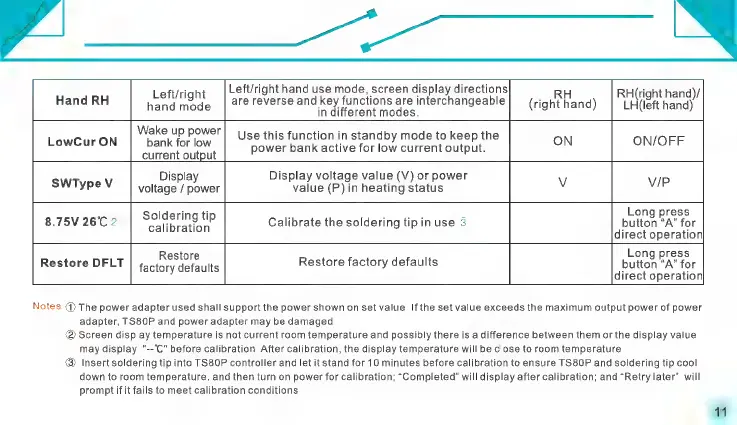
Left/right
hand
use
mode,
screen
display
directions
8
Left/right
Ô
__RH
RH(right
hand)/
Hand
RH
hand
dE
are
reverse
ang
ken
aneHon)
are
Interchangeable
(right
hand)
LH(left
hand)
Wake
up
power
|_
Use
this
function
in
standby
mode
to
keep
the
oN
ON/OFF
LowCur
ON
bank
for
low
power
bank
active
for
low
current
output.
current
output
Display
Display
voltage
value
(V)
or
power
SWTypeV
|
voltage
/
power
value
(P)
in
heating
status
ve
V/p
Ï
i
n
Long
press
8.75V
26°C
2
ed
Calibrate
the
soldering
tip
in
use
3
button
“A”
for
direct
operation
Restore
Long
press
Restore
factory
defaults
button
“A”
for
Restore
DFLT
direct
operation
factory
defaults
Notes:
0)
The
power
adapter
used
shall
support
the
power
shown
on
set
value.
If
the
set
value
exceeds
the
maximum
output
power
of
power
adapter,
TS80P
and
power
adapter
may
be
damaged.
@
Screen
display
temperature
is
not
current
room
temperature
and
possibly
there
is
a
difference
between
them
or
the
display
value
may
display
"--C"
before
calibration.
After
calibration,
the
display
temperature
will
be
close
to
room
temperature.
®
Insert
soldering
tip
into
TS8OP
controller
and
let
it
stand
for
10
minutes
before
calibration
to
ensure
TS80P
and
soldering
tip
cool
down
to
room
temperature,
and
then
turn
on
power
for
calibration;
“Completed”
will
display
after
calibration;
and
“Retry
later”
will
prompt
if
it
fails
to
meet
calibration
conditions.