
 Need help?
Do you have a question about the MIRABELLA Snap 8S and is the answer not in the manual?
Download and install the 'Mirabella Genio' APP from the App Store or Google Play for optimal experience.
The camera requires an SD card to record footage; it functions without one but cannot save recordings.
Mount the bracket securely onto the wall as the first step in camera installation.
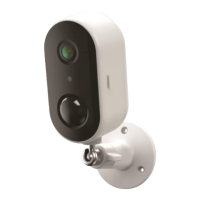
Attach the camera to the bracket and secure it by tightening the provided screw.
Manage sharing permissions for the camera with other Genio APP users.
View detailed camera information including owner, Virtual ID, and IP address.
Configure battery reminder percentage settings for the device.
Adjust core functions like Talk Mode, Flip Screen, and Time Watermark.
Control motion detection ON/OFF and adjust sensitivity level to save battery.
Access settings specifically for the inserted 8GB-128GB Micro SD card.
View notifications when new firmware is released for the camera.
Remove the device from the account to re-pair or pair under a different account.
 General
| Brand | MIRABELLA |
|---|---|
| Model | Snap 8S |
| Category | Outdoor Camera |
| Language | English |

 To Next Page
