Mito TurnTable Quick Guide
5
Below is an example of using:
Step 1. connection: select the appropriate shutter line, and use the shutter line connected to the smart turntable and
camera.
Step2. To test turntable control camera (the first use is necessary):To start the smart turntable (Reference
documentation: How to connect the computer to the turntable), adjust the speed of their own needs, open the camera, manual
adjustment of the camera focus, to ensure that the focus is accurate, (Be sure to focus, the camera focus mode is set to M, Not
use AF) Then press the remote control “ ”button, If the camera can take pictures, it is normal to prove the connection.
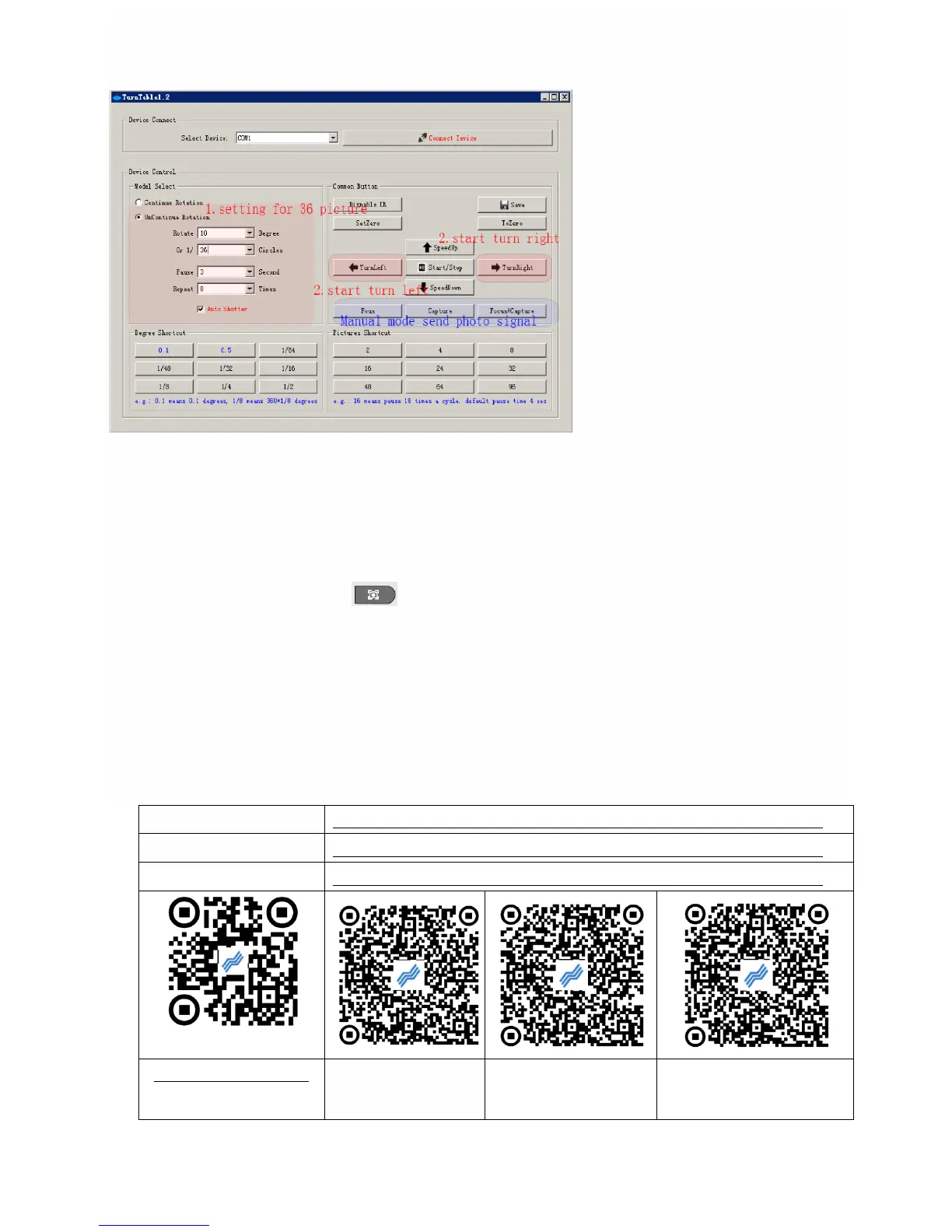
Note:need to control the camera, you must check the software interface, automatic shutter".
Step 3. Set the turntable intermittent rotation: set the time of the suspension and the number of suspended. With the
shortcut button set, the default pause time is 4 seconds. As shown in the "1 setting", the 36 mode is set: 10 degrees each time,
pause 4 seconds each time, 36 times to complete a circle shot.
Step 4. To start taking pictures: press left turn (or right) start the turntable, the turntable can rotate intermittently, pause
and send the shutter signal when the pause. If you want to stop, press the start / stop button to stop.
Software and manual download:



 To Previous Page
 Loading...