EasyManua.ls Logo

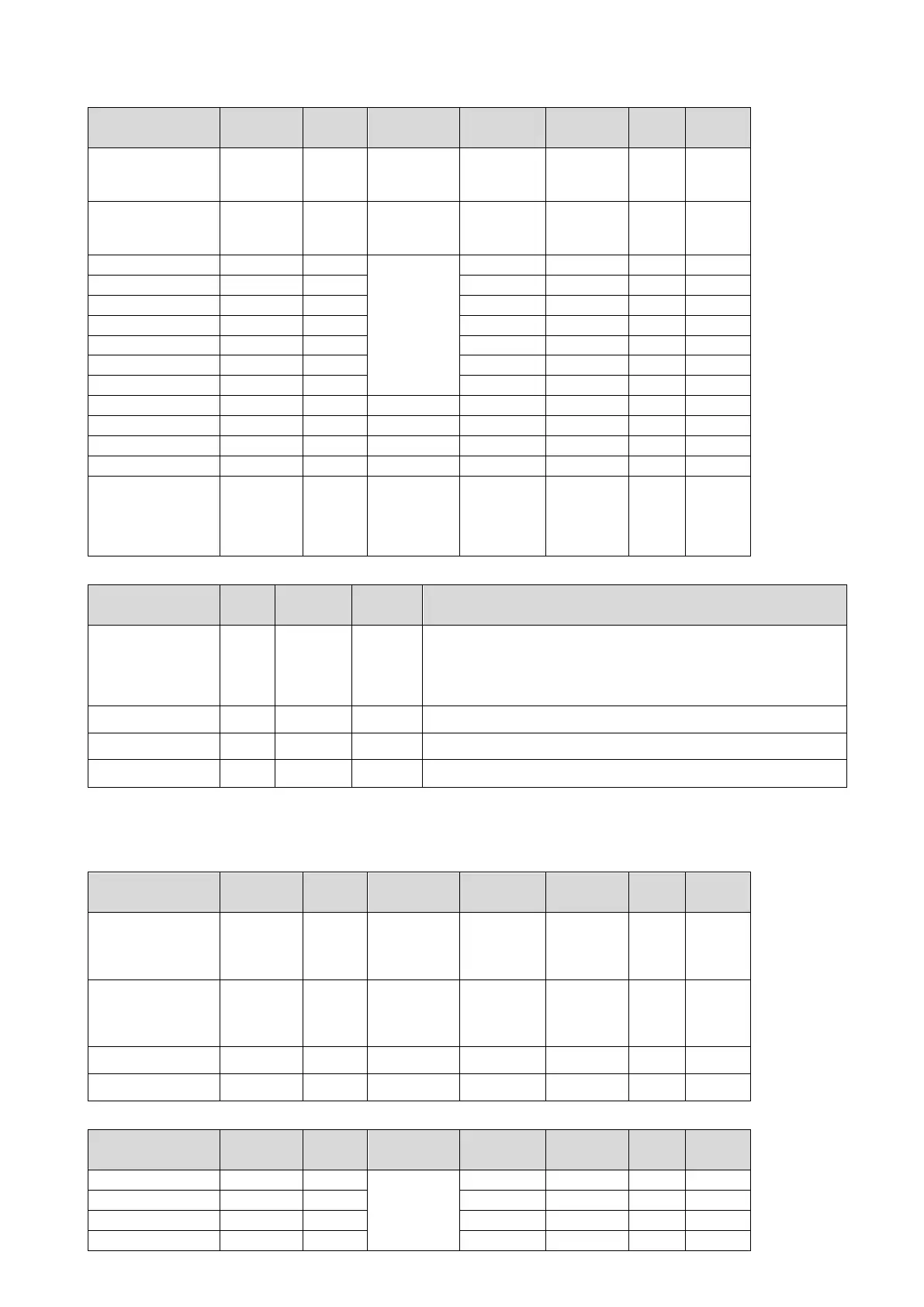
mixars PRIMO - MIDI MAP (Continued); Transport Controls Mapping; Platter LED Control Mapping; Library Controls Mapping

mixars PRIMO
48 pages
Print Icon
To Next Page IconTo Next Page
To Previous Page IconTo Previous Page
Loading...
Transport Controls
Functionality
Control
Type
Output
Lighting MIDI
MIDI Type
MIDI
Channel
Key
MIDI
Control
MIDI
Control
(Shifted)
Sync
Button
Trigger
Yes.
Lit blue =
On. Dim blue
= Off
Note
N
2
3
CUE
Button
Trigger
Yes.
Lit red = On.
Dim red =
Off
Note
N
1
Play
Button
Trigger
Yes.
Lit blue =
On. Dim blue
= Off
Note
N
0
Censor
Button
Trigger
Note
N
16
17
Slip
Button
Trigger
Note
N
15
Pitch Bend Up
Button
Trigger
Note
N
12
40
Pitch Bend Down
Button
Trigger
Note
N
11
39
Key Lock
Button
Trigger
Note
N
13
41
Vinyl
Button
Trigger
Note
N
7
Touch Needle
Touch Strip
Absolute
CC
N
43
Tempo Slider
Fader
Absolute
CC
N
9
Platter Touch
Button
Trigger
Note
N
6
Platter Position
Platter
Relative
CC
N
6
Channel Fader Start
(Shift and move
fader from minimum
position, relative to
channel reverse
condition)
Shift +
Fader
Trigger
Note
N
49
Platter LED control
Functionality
MIDI
Type
MIDI
Channel
Key
MIDI
Control
Control Value (HEX)
Platter Ring LED (24
LEDs in the Ring)
CC
N
10
0x00: All LEDs OFF
0x01 to 0x18: Single LED ON from 12 O’clock positon, other LEDs OFF
0x21 to 0x38: Single LED OFF from 12 O’clock positon, other LEDs ON
0x41 to 0x58: Accumulating LED ON from 12 O’clock position.
0x7F: All LEDs ON
Other value: ALL LEDs OFF
Platter Logo LED
(Red)
CC
N
12
0x00 to 0x05: LED OFF to LED brightest
Platter Logo LED
(Green)
CC
N
13
0x00 to 0x05: LED OFF to LED brightest
Platter Logo LED
(Blue)
CC
N
14
0x00 to 0x05: LED OFF to LED brightest
Library Controls
Functionality
Control
Type
Output
Lighting MIDI
MIDI Type
MIDI
Channel
Key
MIDI
Control
MIDI
Control
(Shifted)
Track Load A
(Deck 1/3)
Button
Trigger
Yes.
Lit blue(red)
= On. Dim
blue (red) =
Off
Note
G
4
Track Load B
(Deck 2/4)
Button
Trigger
Yes.
Lit blue(red)
= On. Dim
blue(red) =
Off
Note
G
5
Library Back
Encoder
(Press)
Trigger
Note
G
6
7
Library Scroll
Encoder
(Turn)
Trigger
CC
G
0
1
Performance Pads Mode switching
Functionality
Control
Type
Output
Lighting MIDI
MIDI Type
MIDI
Channel
Key
MIDI
Control
MIDI
Control
(Shifted)
HOT CUE
Button
Trigger
Yes.
Lit blue =
On. Dim blue
= Off
Note
N
1
3
ROLL
Button
Trigger
Note
N
7
14
SLICER
Button
Trigger
Note
N
9
10
SAMPLER
Button
Trigger
Note
N
11
15
45

Related product manuals