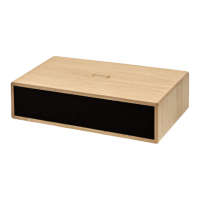
Bamboo Wireless Charging Clock User Manual
Specication:
• Power Supply Input: 9V / 2A
• Wireless Charger Output: 15W
• LED Display
Package content:
• Bamboo Wireless Charger Clock
• USB-C Cable
• Manual
Safety Guidelines:
• Do not disassemble or attempt to repair the charger by yourself, as it may result in damage.
• Avoid hitting, dropping, puncturing, or applying excessive pressure to the product.
• Maintain the recommended distance if you have a pacemaker or articial cochlear implant.
• Do not place magnetic cards or IC cards on the charging surface, as it may cause data loss or damage.
• Use the charger in a location with suitable temperature and humidity levels.
Functionality:
• Upon connecting to power, the charger will display the time, date, and temperature. It also features an alarm setting.
1. Time Settings:
• Press and hold the SET button to select between 12-hour and 24-hour modes.
• Press the SET button again to set the desired hours/minutes.
• Use the UP - DOWN button to adjust the hours/minutes.
• Press the SET button after adjusting to save the desired hours/minutes.
2. Celsius/Fahrenheit Setting:
• Long-press the UP button to switch between degrees Celsius and Fahrenheit.
3. Date & Alarm Settings:
1. When the hour is displayed, press the SET button to enter the day/month/year setting.
2. Press and hold the SET button to set the year. Use the UP/DOWN buttons to select the correct year.
3. Press the SET button to move to the month setting. Use the UP button to adjust the month. Press SET again to set the
date and time.
4. When it shows “ONA1,” press SET to set the alarms. You can set up to 3 alarms (A1, A2, A3). Long-press the SET button
to set the alarm time.
5. When you’ve set the alarm, you can turn it off by clicking on the SET button.
4. Display Modes:
• Use the UP button to navigate to the DP (display mode) setting. Press SET to return to the home screen.
• DP=1: Displays time for 10 seconds and date for 2 seconds.
• DP=2: Displays time only.
5. Display Brightness Setting:
• Use the DOWN button to adjust the brightness.
• BA: Automatically adjusts brightness based on time.
• B1-B4: Sets specic brightness modes.
• L5: Activates sleep mode after 5 seconds of inactivity.
• Press the SET button to save the desired brightness.
Disclaimer: Power Delivery Adapter Requirement
Please note that the Bamboo Wireless Charger Clock requires the use of a Power Delivery (PD) adapter with a minimum
power output of 22.5 watts (W) or higher for optimal performance and compatibility.
Using a PD adapter with appropriate power rating ensures that the Bamboo Wireless Charger Clock operates eciently and
provides the intended charging capabilities. It allows for faster charging and ensures compatibility with a wider range of
devices. We strongly recommend using a reputable PD adapter from a trusted manufacturer to ensure safety and reliable
performance. Incompatible or lower-powered adapters may result in slower charging times or may not provide sucient
power for the Bamboo Wireless Charger Clock to function as intended.
Please carefully review the specications and power requirements of your PD adapter before connecting it to the Bamboo
Wireless Charger Clock. If you have any doubts or concerns, we advise consulting the user manual or contacting our custo-
mer support for further assistance.
Please handle and use the Bamboo Wireless Charging Clock responsibly to protect the environment.


 To Next Page
 Loading...