MO8648
EN
Smart Finder
Product specifications:
Wireless Frequency: 2.402 – 2.48 GHZ
Radiated Power: ≤4dBM
Instructions:
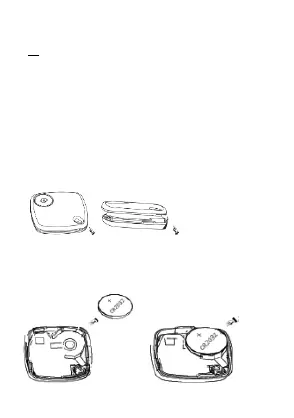
1. How to change the battery:
Step 1: Open the top cover from the snap gap.
Step 2: Press and fit the cell on below position, negative pole
towards the down side.
Step 3: Close the top housing.
Snap gap: Open the top cover from the snap gap:
Open the top cover from the snap gap:
Battery cell position: The negative pole towards the
downside:


 To Next Page