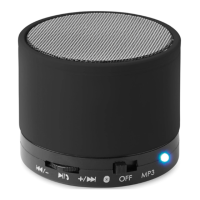
MO8906
EN
Bluetooth speaker with FM radio
Important: Read these instructions before using the product
Warning:
Keep speaker away from water and moisture or any heat source.
Permanent hearing loss may occur if speaker is used at high volume. Set the volume to a safe level.
To prevent possible hearing damage, do not listen at high volume levels for long periods.
FM Scan Radio:
With the provided cable, insert Mini USB plug into speaker, the cable will act as the antenna. It is not
necessary to connect the cable anywhere else.
Turn the power switch to the “on” position
Press and hold MODE button to enter FM mode
Press (1) to scan stations.
Press (2) to manually scan forward.
Press (3) to manually scan backward.
Using USB or TF Card:
1. Insert the USB or TF card (with MP3 Files) into the proper port on the speaker.
2. Control volume and playback as described above.
Charging:
1. The speaker contains a rechargeable Lithium-ion battery. Before use, highly recommend to charge
the battery for at least 4 hours
2. With the provided cable, insert the mini USB plug into the speaker and the standard USB port on
your computer
Press MODE button to switch between Bluetooth/FM Radio / Micro SD
Connection to Bluetooth device:
1. Turn the power switch to the “on” position. After 5 seconds you will hear a start-up chime.
2. On your device, turn on Bluetooth to search, device name MO8906 and connect. For first time use,
you may need to enter the password ”0000” to connect, Newer versions may not need password
and it will connect automatically, when it connected, the LED will flash slowly.
3. Play audio from your device, you can control the audio from the unit:
a) Previous track/volume Down (3)
b) Pause/Resume play (1)
c) Next track/volume up (2). To change tracks or pause, press buttons quickly,
to adjust volume, hold buttons down until desired volume is reached.
To answer a call:
When a call comes through quickly press to answer (1): The speaker includes a microphone in the
base, you will be able to hear and speak to the caller through the speaker. Press (1) quickly to hang up
call.
Troubleshooting:
Bluetooth cannot connect to device: confirm the speaker is under searching status and Bluetooth on
your device is turned on
No sound: check the volume control on the speaker and check the volume control on the connected
device
Note:
When the power on the speaker becomes low the star-up chime will sound every 20 seconds.
When battery is depleted, it will enter a protection state. At this time, it cannot be used under


 To Next Page
 Loading...