
 Need help?
Do you have a question about the Mobee Magic Charger and is the answer not in the manual?
Eliminates the need for frequent battery replacements for your Apple Magic Mouse.
A greener way to use devices with a charger made of recyclable materials.
Provides long-term savings compared to disposable batteries.
Utilizes wireless charging technology for convenient power delivery to your mouse.
Take out the 2 AA batteries from your Apple Magic Mouse.
Place the Mobee Battery Pack in the mouse where the AA batteries were.
Connect the Charging Station to any available USB port on your computer.
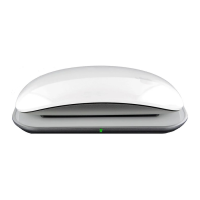
Place the Apple Magic Mouse onto the Charging Station to begin charging.
Details the items included in the pack: Battery Pack, Charging Base Station, USB Cable, and User Manual.
Provides key specifications like size, weight, autonomy, charge time, battery life, and warranty.
 General
| Brand | Mobee |
|---|---|
| Model | Magic Charger |
| Category | Battery Charger |
| Language | English |

 To Next Page
