OPERATING INSTRUCTIONS:
Spotlight and Emergency Light:
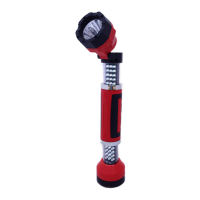
1. Make certain the light is retracted all the way down to the minimum height.
2. To turn On the Spotlight, Press firmly the ON/OFF Push Button Switch located on the forward
section of the light.
3. To turn ON the RED Emergency Light, press the ON/OFF Push Button Switch again.
4. To turn OFF the Emergency RED Light, press the ON/OFF Push Button Switch again.
Worklight:
CAUTION: Make sure the Spotlight/Emergency RED Light ON/OFF Push Button Switch is in the
OFF position and directly facing you. The Worklight includes high intensity 30 LED’s when
turned ON. DO NOT AIM OR ILLUMINATE THE WORKLIGHT AT YOUR EYES OR OTHERS NEAR
YOU WHEN IT IS IN “ON” POSITION.
1. Hold the LightBolt grip firmly with one hand. Make certain the Spotlight / Emergency RED “POWER”
Button is facing you when continue to the next step.
2. To turn ON one section of the Worklight, Hold down to the forward part of the LightBolt2 with other
hand and pull apart by extending the light all the way outward until it stops.
3. To turn ON two sections of the Worklight, Hold down to the base of the LightBolt2 with other hand
and pull apart by extending the light all the way outward until it stops.
4. To turn OFF the Worklight, retract either one or both sections for the desire power intensity.
Swivel Spotlight / RED Flashing Light:
1. Press the Swivel Head Release Latch Push Button for the desire beam angle.
2. To stow the Swivel Head in a lock position, swing the head all the way back to hear a snapping click.
Magnetic Base:
NOTE: The LightBolt2 unit is bi-directional and may be operated in any directions. The housing
base is deigned with magnetic bars that can be mounted to any flat ferrous material.
1. Mount the base to any flat ferrous material (Carbon steel base).
2. Turn ON the Spotlight, RED flashing light or just extend the unit to illuminate the work area.
3. Reposition the light either in right side up, upside down or right angle to the mounting surface.
Model No. 4032
Sheet 5 of 8


 To Next Page
 Loading...