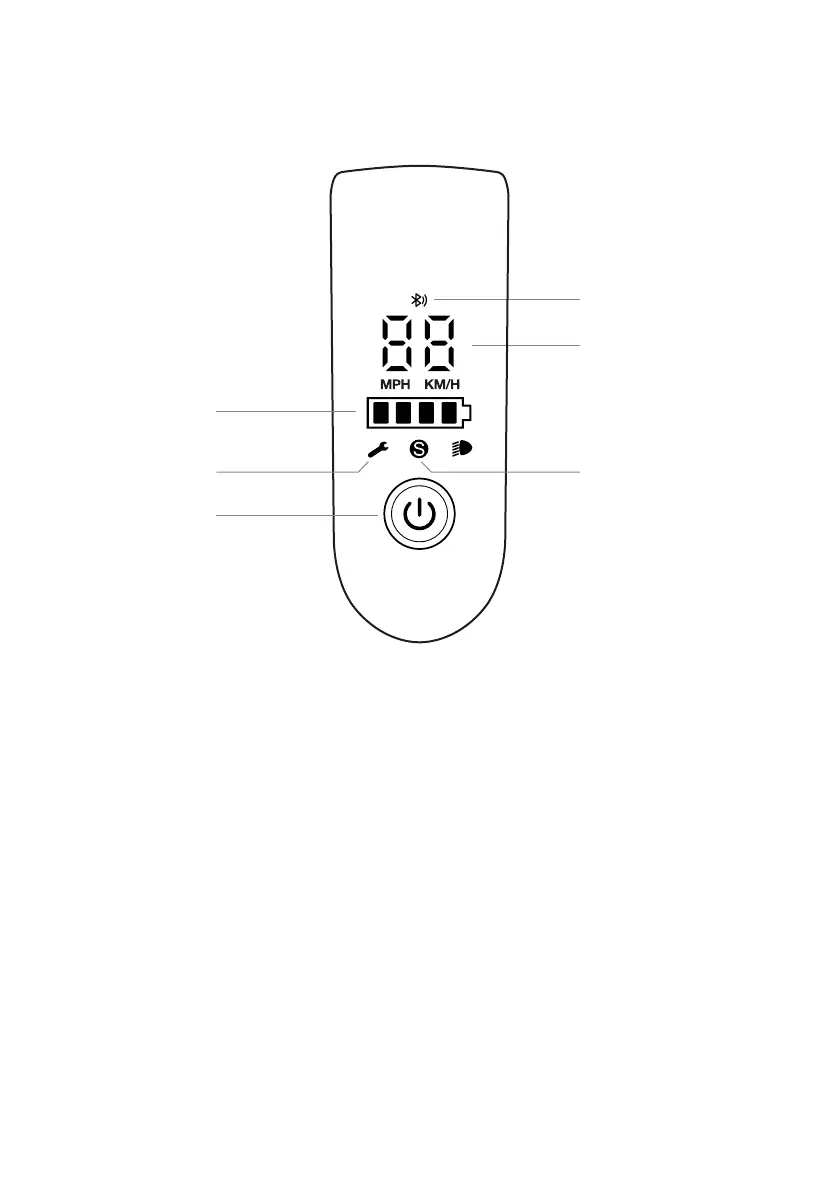
1. Speedometer: displays the current speed of the scooter.
2. Modes: there are three riding modes available. "Black" indicates Energy Saving mode (maxi-
mum speed 6 km/h, ideal for beginners), "S White" indicates Standard mode (maximum speed 15
km/h) and "S Red" indicates Sports mode (maximum speed 25 km/h, powerful, only recommen-
ded for experienced riders).
3. Bluetooth: the icon indicates that the scooter is connected with the mobile device.
4. Error: the spanner icon indicates that the scooter has detected an error.
5. Battery level: the battery level is indicated by 5 bars, each representing approximately 20%
of the battery.
6. Power button: press the button to turn the scooter on, to turn it off press and hold the button
for 3 seconds. After power on, press the button twice consecutively to turn the front light on/off
and press once to switch between modes.
1
3
2
CONTROL PANEL/CONTROL INFORMATION
5
6
4
05



 To Next Page