5. INSTRUCTION MANUAL
1) Sound Sources
The default setting or input when powered on is stereo input mode. We suggest using
stereo input mode when connected to PC, TV or any stereo sound sources, and AC-3
input mode when connected to any sound sources with DTS or Dolby Prologic. Press
2.1/5.1 input buttons-to transfer between the two modes.
2) When the system is on, press ST-BY button to enter hibernation mode.
3) Press INPUT, choose between stereo, and AC-3 to switch input signal. An appropriate in-
dicator will be on.
4) Press VOL + and VOL - to set master volume.
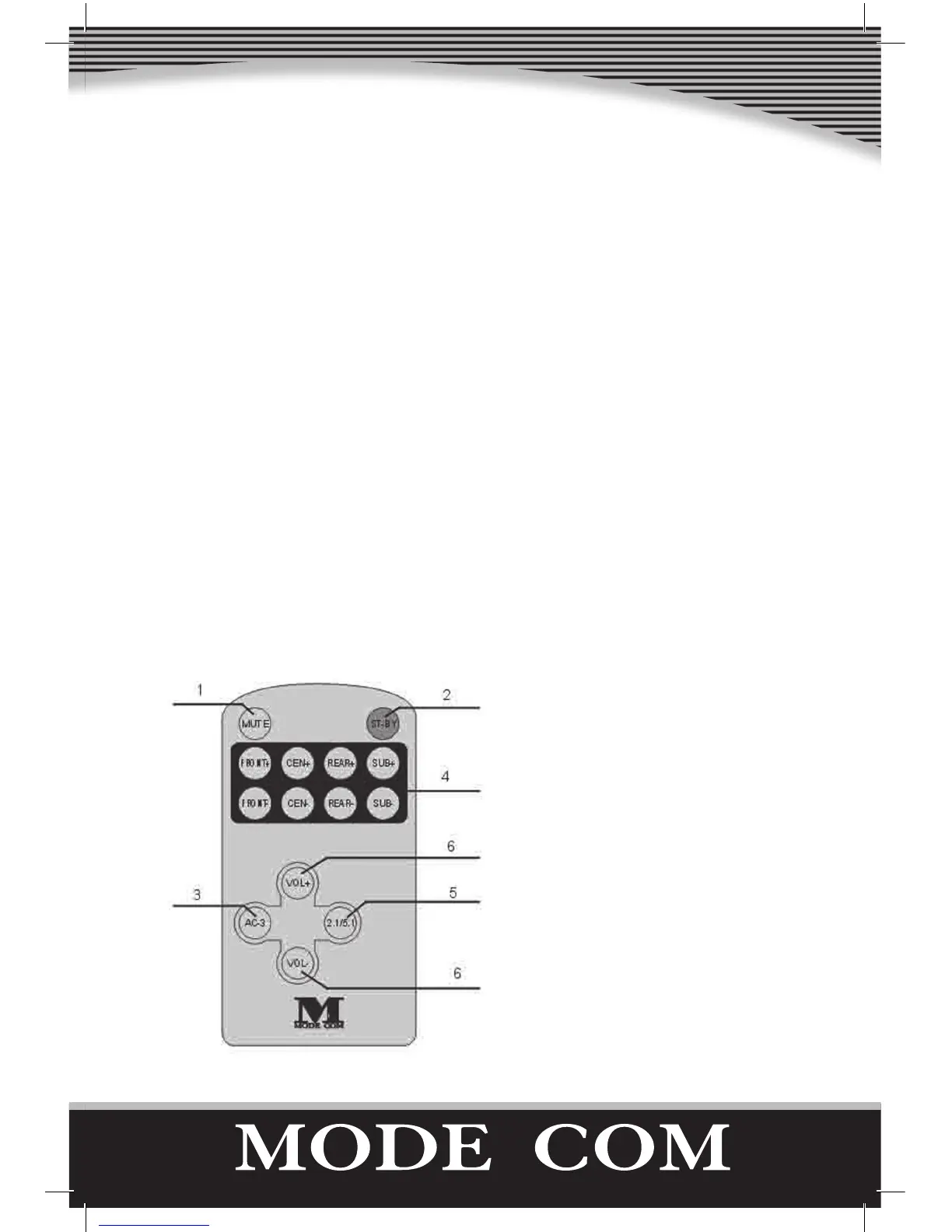
6. REMOTE CONTROL- INSTRUCTION MANUAL
1). Press MUTE to enter silence setting.
2) Press ST-BY- the system will go into
the hibernation mode.
3) Press AC-3- AC-3 input setting.
4). Buttons to adjust volume for front,
centre, rear and subwoofer speakers.
5) Press 2.1/5.l – switches between ste-
reo and AC-3 modes.
6) These are buttons to adjust master
volume.
Illustration 3: Infrared Remote Control


 To Next Page