(3) Setting Menu
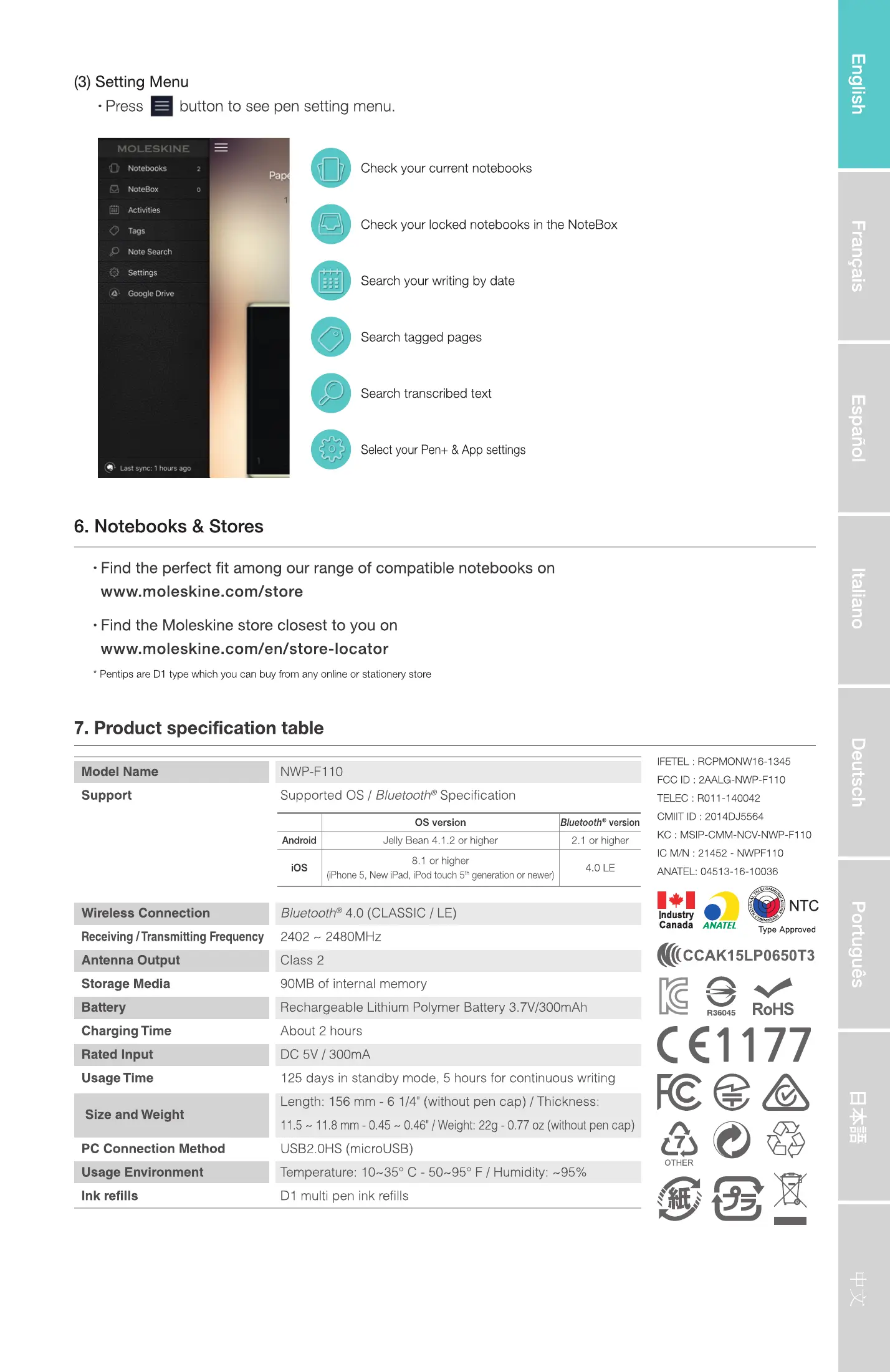
button to see pen setting menu.
Check your current notebooks
Check your locked notebooks in the Noteaox
Search your writing by date
Search tagged pages
Search transcribed text
SelectyourPen. & App settings
7,
6. Notebooks & Stores
• Find the perfect fit among our range of compatible notebooks on
www.moleskine.com/store
• Find the Moleskine store closest to you on
www.moleskine.com/en/store-locator
• Pentos are Can stationeryStare
7. Product specification table
Model Name
Support
Wireless Connection
Receiving/TransmittingFrequency
Antenna Output
Storage Media
Battery
Charging Time
Usage Time
Size and Weight
PC Connection Method
sage Environment
Ink refills
Moleskine Pen+_User Quick Guide
NWP.FI 10
Supported OS / Bluetooth" Specification
Android
OS version
Jelly Bean 4.1.2 or higher
or higher
etOOth v
2.1 or higher
IFETEI_ RCPMONvV16-13å5
FCC O 2AA1_G.NWP.F' '0
TELEC :
CMIIT ID : 2014DJ556d
KC MSIP.CMY.NCV.WQP.FI 10
c MIN : 21452- NWPFIID
ANATEL,
liPhone S. New Pad, iPod touch S" graaticn cr newcrl
Bluetooth' (CLASSIC / LE)
2402 - 2480MHz
Class 2
90MB of internal memory
Rechargeable Lithium Polymer Battery 3.7V/300mAh
About 2 hours
DC 5V / 300mA
125 days in standby mode, 5 hours for continuous writing
Length: 156 mm - 6 1/4' (without pen cap) / Thickness:
11.5- 11.8mm-0.45 - 046' ,'Weight:22g - 077 oz(withoutpencap)
USB20HS (rncrousa)
Temperature: 10-350 C - 50-950 F / Humidity: -95%
Dl multi pen ink refills
NTC
In".ty
ANArEt
_120x185.indd
5
Type d
(((CCAK15LP0650T3
RoHS
c0177
cea
OTHER
16/12/16
11


 To Previous Page
 Loading...