Installation
Specications Notes
1. Method 1: Install with Back Clip
Method 2: Install with Velcro Clip
How to Remove the Intercom from Helmet
First unplug the headset, then press the xed buckle in the middle of the back clip with one
nger (push towards the side of the helmet), so that the back clip hook is detached from
the intercom, and push the intercom upwards to let it slide out of the back clip smoothly to
complete the disassembly.
Charging
1. Before using the Bluetooth intercom, please use the attached charging cable to charge
the intercom. The small type-C interface on the charging line is connected to the USB
charging interface of the Bluetooth intercom, and the large USB connector on the charging
cable is connected to the following charging interface for power supply:
A. USB interface of computer;
B. A mobile power supply with DC 5V output;
C. A USB power adapter with DC 5V output.
2. When charging, the red LED is always on, and when fully charged, the red light goes out
slowly. It takes up to 2.5 hours to fully charge the unit.
1. If you do not use intercom for up to one month or more, please charge the intercom once
every two months in order to protect the lithium battery;
2. The storage temperature of this product is -20 ℃ to 50 ℃ , and do not store in the
environment with too high or low temperature, otherwise, the service life of the product will
be aected;
3. Do not expose this product to re to avoid explosion;
4. Do not open other screws to the intercom to avoid short circuit of main board or battery
damage.
5. USB emergency shutdown: during working state, the Bluetooth intercom will power o if
insert USB charging, which will not save any data.
Transmission Range
Connection Distance with Mobile
Bluetooth Version
Bluetooth Protocol
Charging Port
Standby Time
Working Time
Battery
Charging Time
Charging Voltage
Speaker Diameter
Frequency Range
Temperature Range
2000m
20m
5.0
A2DP, AVRCP
Type-C
up to 500H
30H
1000mA
2H
5V
40mm
2.4GHz
-20~50℃
Unit 25 Basepoint Business Centre, Aviation Park, West Christchurch, United Kingdom BH23 6NX
www.momanx.com
@MomanGlobal
https://moman.co/youtube
Moman (UK) Limited
4. Phone Control
Answer the call:
press the Function Key
Automatic answer:
When the phone calls and there is no operation
after 8 seconds, it will answer the call automatically.
Reject the call:
press and hole the Function Key for 2 seconds.
End the call:
press the Function Key.
Redial:
In standby mode, press the On/Off Key twice to dial the last
call number.
5. Volume Adjustment
(1)
Decrease:
continuously turn the Knob clockwise.
(2)
Increase:
continuously turn the Knob counterclockwise.
※ There is voice alarm for two high or two low volume.
6. FM Radio
(1)
Turn on:
under standby mode, press the Function Key twice to switch
to the FM radio.
(2)
Select Channels:
quickly rotate the Knob and release to adjust and
select channels. Continuously rotate the Knob to select different channels.
Rotate the Knob continuously to enter volume adjustment.
(3)
Turn off:
press the Function Key twice to get back to the previous mode.
※ If the signal is weak indoor, you could try to turn on the FM radio near
window or in the open area.
※ When FM radio is turned on and there is a phone calling, the machine
will cut off FM radio automatically and connect to the mobile phone. It gets
back to the FM radio when the call ends.
9. Voice Wake up
In standby state, long press the M Key for 4 seconds to enter Voice Wake up Function.
10. Restore Factory Settings
In power-on state, long press the On/Off key + M Key for 6 seconds until the red indicator is on.
Power off and the memory is clear.
11. Battery Announcement
In standby state, long press the M Key for 6 seconds and the voice announces battery, divided
into 3 levels.
7. Function Priority
Level 1:
Mobile Phone
Level 2:
Intercom
Level 3:
Music/FM Radio
8. Language
There are 8 languages for choice.
When it is on, press the M Key and rotate the Knob at the same time
to change the language of voice prompt.
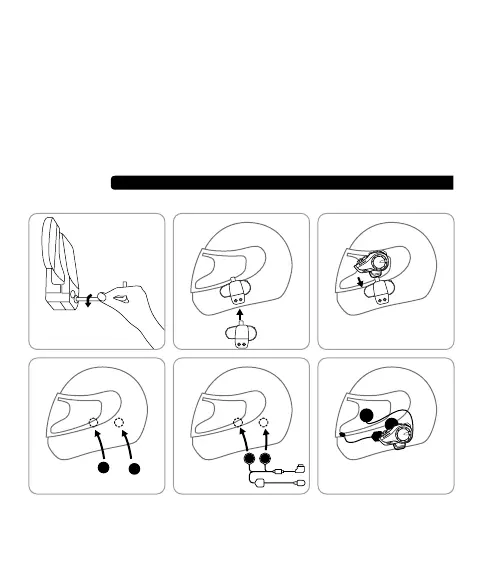
① Use the screwdriver to loosen the screws of the back clip so that it can open to a proper
extent.
② Open the helmet liner, insert the clip into the right position on the left side of the helmet and
Separate the hook and loop fasteners. First stick the hook onto the Velcro clip; choose
the right installation position on the helmet and stick the loop to the position. Install the
intercom onto the Velcro clip.
The installation of speakers can refer to the description above.
tighten the screw.
③ Slide the intercom into the back clip slot to make sure it locks firmly.
④ Open the helmet liner (ear position), clean the EPS surface of the helmet, and stick a piece
of horn Velcro on the left and right sides of the helmet.
⑤ Stick the speaker on the fixed Velcro surface and the speaker with short line should be
installed close to the machine. Fix the microphone and arrange the helmet lining and cable.
⑥ Insert the headset into the jack of the intercom and tie up the headset cable.


 To Next Page
 Loading...