2
Important User Interface Information
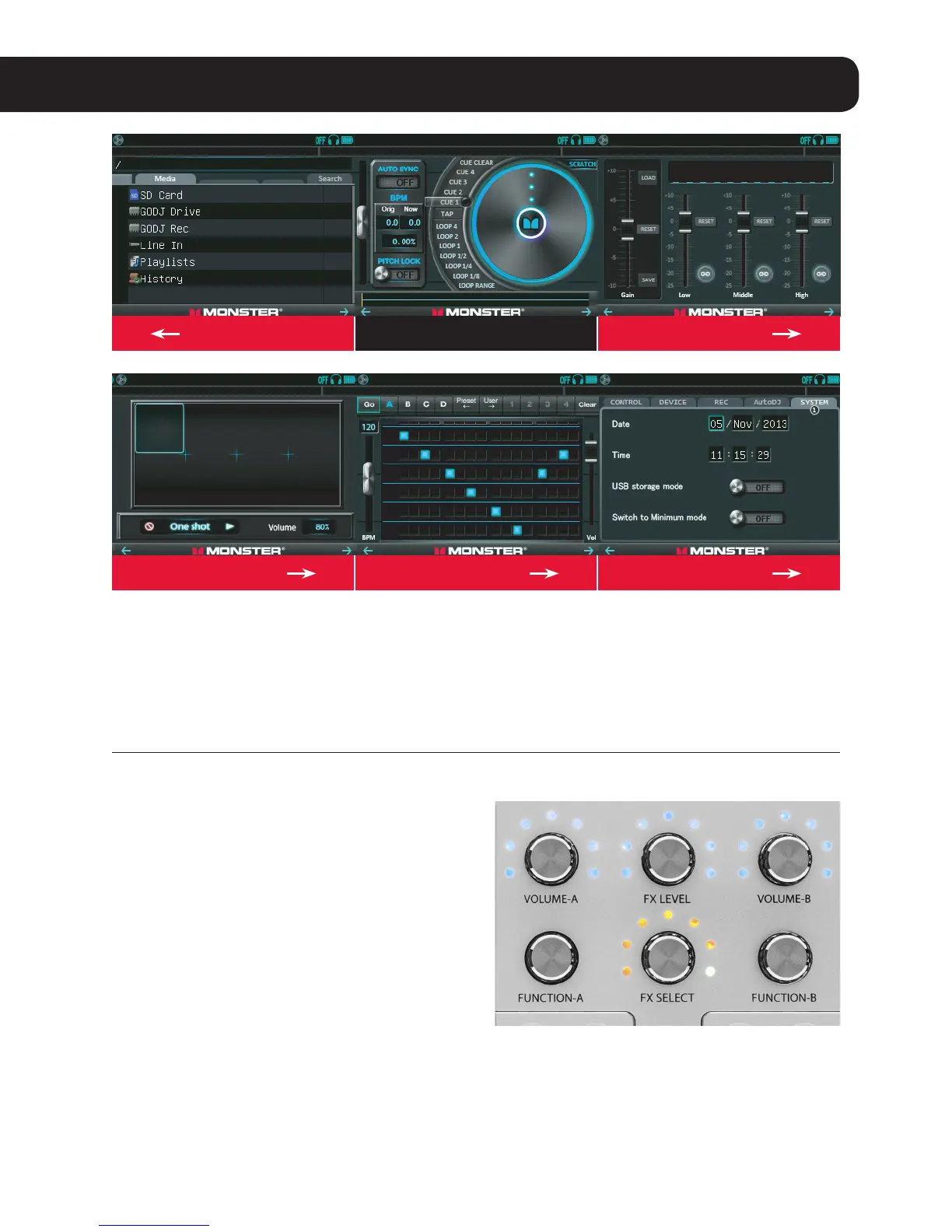
ABOUT THE TOUCH SCREENS
When you turn on the GO-DJ™, you will see a
Digital Turntable on each screen. You can swipe
le and right at the bottom of each screen (start
swiping from where it says “Monster”) to get to
other screens. If you prefer not to swipe, you can
ABOUT THE FUNCTION KNOBS
There are three ways to manipulate these buttons:
• Turn
• PressandRelease
• PressandTurn
The knobs are actually continuous controllers
that can be turned endlessly. They can also be
clicked like buttons. This does things like enable /
disable effects, select folders, and other functions
depending on the context (i.e. which touch screen
is being displayed). You can also turn them while
holding them down, which also does a variety of
things depending on the context.
For more info Please check the manual for a detailed description
of all of the functions of each controller.
just touch the small arrows in the two bottom
corners of each screen. If you see an arrow in only
one of the bottom corners, that’s because you’re
at the le most or right most screen.
Start HereSwipe Once Swipe Once
Swipe AgainSwipe Again Swipe Again


 To Next Page