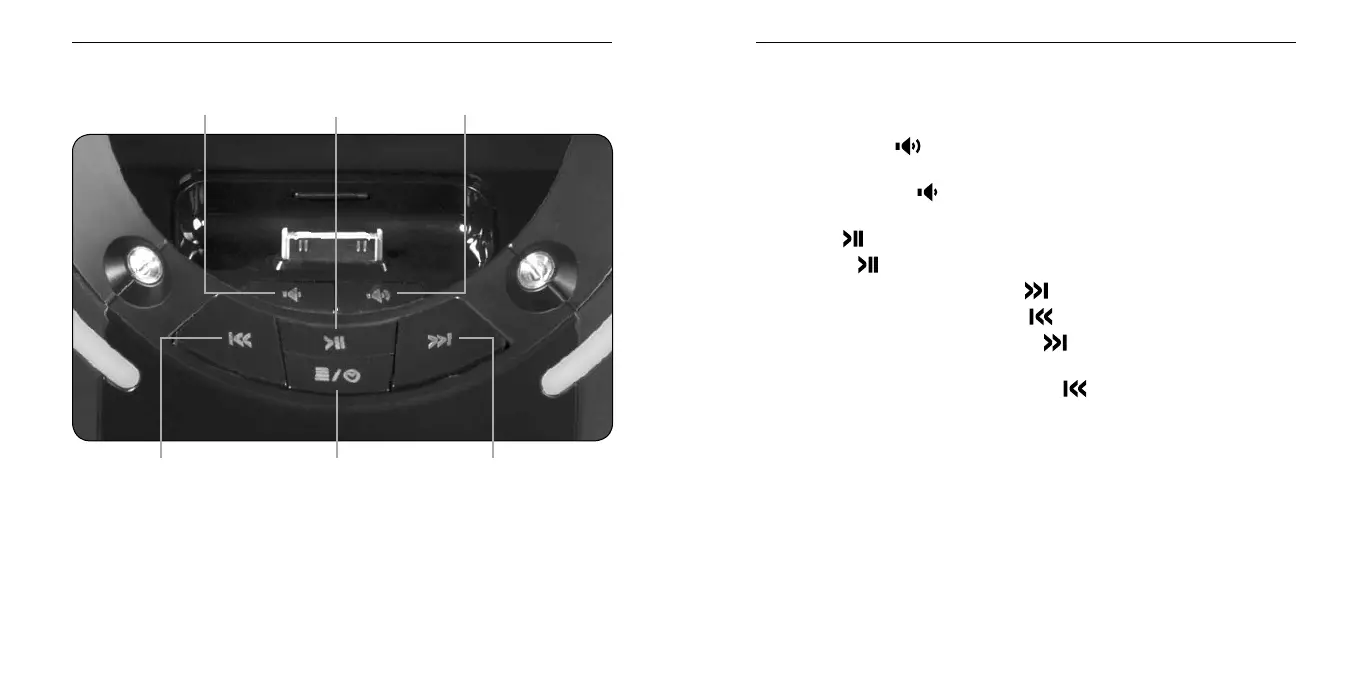
Playlist/Clock
Visualizer App
Volume Down
Play Previous
Track/Scan
Play/Pause
Play Next
Track/Scan
Volume Up
The Tron Light Disc Audio Dock can be controlled by either control panel
on the front of the unit or the remote control.
Using Tron Light Disc Audio Dock Control
Panel to Operate iPod/iPhone
Volume Up: Push
and hold to increase volume. Release when
desired volume is reached.
Volume Down: Push
and hold to decrease volume. Release when
desired volume is reached.
Play: Push
and release.
Pause: Push and release. Push again to resume play.
Skip Forward To Next Track: Push and release.
Skip Back To Previous Track: Push
and release.
Fast Forward Through a Track: Push and hold. Release to stop
scanning and resume normal play.
Scan Backward Through a Track: Push
and hold. Release to stop
scanning and resume normal play.
Playlist/Clock/Visualizer App: Exclusive to the Tron Light Disc Audio
Dock, the Monster Visualizer’s high resolution graphics sync with your
music and engages the disc’s Monster LED Light Drive for a total
immersion of light and sound.
The included remote control can be used to control playback of a docked
iPod or iPhone. It cannot control playback of other devices connected via
the 3.5mm auxiliary jack.
Make sure the CR2025 battery used by the remote is installed correctly.
If it is old, replace it.


 To Next Page