EasyManua.ls Logo

Mopar Uconnect - User Manual

Default Icon
5 pages
Print Icon
To Next Page IconTo Next Page
Loading...
01-12-2004 1 of 20 K6858681
D
C
B
A
3x
I
3x
H
F
PT CRUISER . . . . . . . . . .6
300M . . . . . . . . . . . . . . . .7
CONCORDE . . . . . . . . . . .7
SEBRING SEDAN . . . . . .8
TOWN & COUNTRY . . . . .9
PACIFICA . . . . . . . . . . . .10
300C . . . . . . . . . . . . .11,12
MAGNUM . . . . . . . . . .11,12
NEON . . . . . . . . . . . . . . .13
INTREPID . . . . . . . . . . . . .7
STRATUS . . . . . . . . . . . . .8
CARAVAN . . . . . . . . . . . . .9
DURANGO/DAKOTA . . .14
2004 DURANGO . . . .15,16
RAM . . . . . . . . . . . . . . . .17
LIBERTY . . . . . . . . . . . . .18
GRAND CHEROKEE . . .19
E
CHRYSLER DODGE JEEP
G
# 04720928
Question and Answer IconNeed help?

Do you have a question about the Mopar Uconnect and is the answer not in the manual?

Summary

Important Notes and Installation Overview

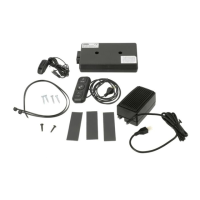
Item A: Module Installation

Place supplied 2-way tape to underside of module. Ensure tape contacts vehicle mounting surfaces.

Item B: Bracket Installation

Measure for bracket mounting holes. Drill two 1/8" holes and install bracket with supplied screws.

Item C: Speaker to Bracket

Install speaker to mounting bracket. Position speaker as shown and tighten thumb screw.

Item D: Microphone Installation

Install mic to overhead console or dome lamp. Route mic cable under headliner towards left A-pillar.

Item E: Control Pad Installation

Install control pad to I/P center console bezel. Make a notch in the inner edge for cable.

1990-2001 Vehicle Wiring Procedure

Jeep Grand Cherokee Installation Guide

Functional Check Procedure

Mopar Uconnect Specifications

General IconGeneral
Display TypeTouchscreen
ConnectivityBluetooth
NavigationAvailable
Voice ControlAvailable
CompatibilityAndroid
SiriusXMAvailable
HD RadioAvailable
Rearview CameraAvailable
Wi-Fi HotspotAvailable
Screen Size8.4 inches
USB PortsYes

Related product manuals