-Inputs and Outputs-
1.
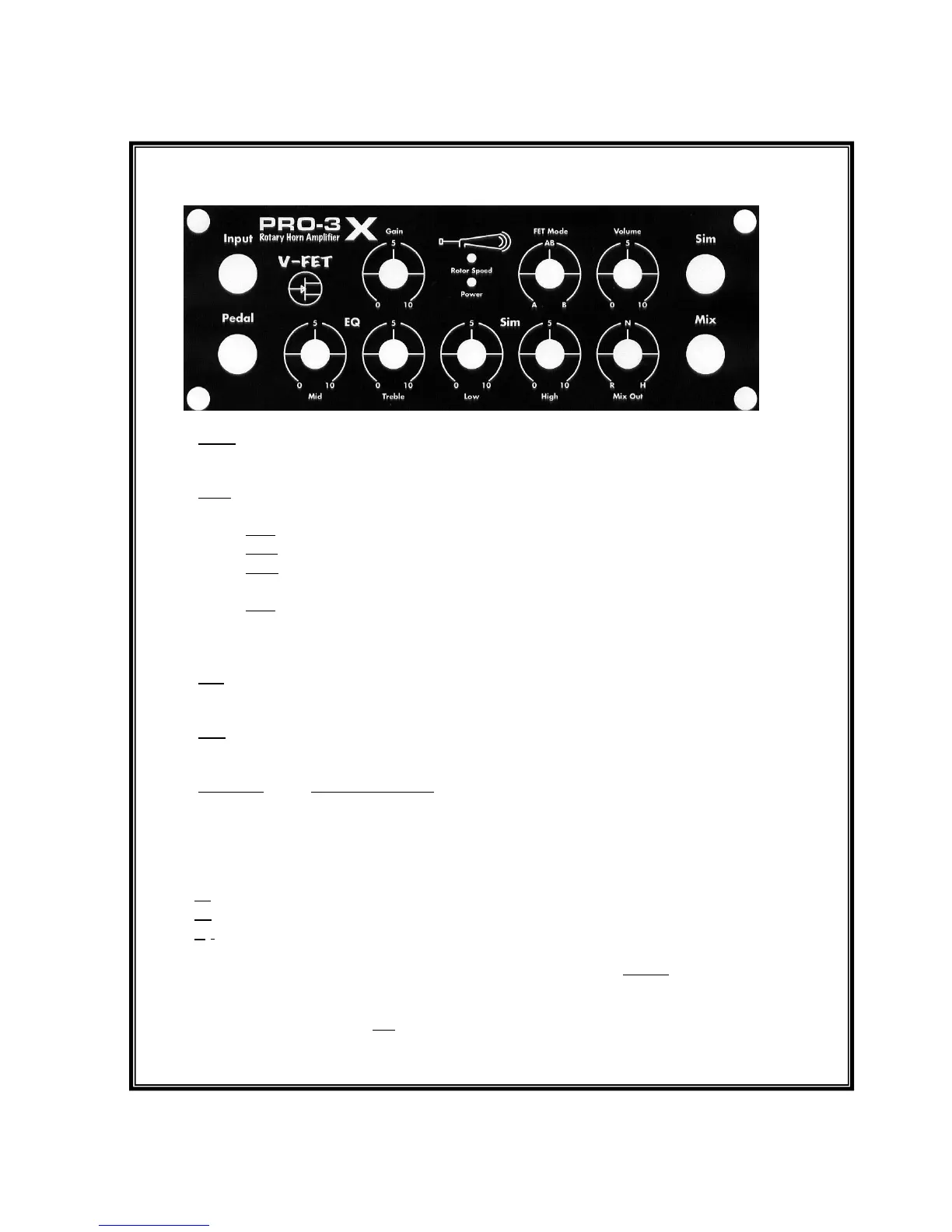
Input- Connect an Organ or a sound source with a line level output signal (see
specifications) with a ¼” shielded cord.
2.
Pedal- Connect the supplied LED dual button speed control pedal. The buttons are of push
on/push off type. Note: If “stop” is illuminated no rotors will spin.
Fast – “LED on” – rotors ramp up to fast speed settings.
Slow – “LED off” – rotors ramp down to slow speed settings.
Stop – “ LED on”- over-rides speeds, rotors ramp down to a complete stop and will
not rotate until “Stop” is pressed again and the stop LED turns off.
Note if the foot switch is not plugged in the rotors will stop.
In an emergency you can use a standard ¼” cord in the footswitch. Fast/Slow will
operate but stop is disabled without a TRS cord.
3.
Sim- Connect this output to an amplifier to produce the low rotor sound generated by the
PRO-3X's internal simulator.
4.
Mix -Output sends an adjustable blend of the built in horn microphone and low rotor
simulator to a house PA system or support amplification. A setting of “5” is a typical blend.
PA Note- If your Keyboard amplifier is connected to a PA system, connect the PRO-3X’s
Sim output to your amplifier. The simulator will be sent to the PA from your Keyboard
amplifier. Turn the “Mix”control fully to “H”. The horn microphone is then available alone
at the Mix output connector for send to the PA. The house sound Engineer will then set the
balance of the horn with the Low Rotor signal from your Keyboard amplifier.
R- Position is low rotor only.
H- Position is horn only.
N- Is neutral or equal amounts of both. This will vary with your EQ settings and low
simulator amplifier settings. A sound engineer may ask you to vary this send. Do so only
after your stage “sound”, volume, EQ, and low rotor parameters are set first.
Supplemental Amplification If you do not send the mix output to a PA, you can use it to
send both the low simulator and some of the rotary horn to your low rotor amplifier to assist
the PRO-3X’s horn in a very loud venue. Caution! To much horn may cause feedback.


 To Next Page
 Loading...