f
I'
~CAUTION:
Equipment damage
The DC power socket does not automatically turn off when the internal battery is
discharged. To protect the internal battery against damage resulting from total discharge,
we recommend that the AC outlet switch is in the "ON" position when using the
Motomaster® Eliminator Power Pack to operate a 12 V DC appliance. Having the AC outlet
ON/OFF switch turned ON enables the alarm to warn you when there is possible damage to
the internal battery.
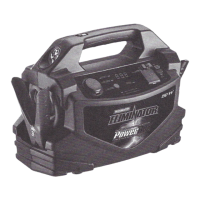
Typical 12 V DC appliances that can be used on the Motomaster® Eliminator Power Pack
are listed in the table below.
12 V DC appliance Watts
5 W incandescent light 5
(built into the unit)
Cellular telephone
6
Small portable cooler
30
Run hours
28
24
4
Operating DC Appliance:
1. Check battery status to ensure the battery is fully charged.
2. Open the DC socketlUSB port cover.
3. Plug the DC appliance into the DC socket.
4. Turn the DC appliance ON.
5. Recharge the Motomaster® Eliminator Power Pack immediately after use.
Operating USB Devices
~CAUTlON: Never connect the USB port directly to a computer USB outlet. This could
result in damage to both devices.
The Motomaster® Eliminator Power Pack is also equipped with a 5 V DC USB power outlet
located on the front panel. It can charge compatible devices including most MP3 players,
PDA's, digital cameras and camcorders that have internal batteries. USB-chargeable
devices usually include a special USB cable (not supplied) that attaches one end to the
USB port and the other end to the device. To activate the USB power, set the USB power
switch to the right side and the indicator will illuminate denoting activation.
12.
i


 To Next Page
 Loading...