Diagnostics B
High-Definition DVR DCX3510-M • Installation Manual 53
365-095-17066-x.1
Field Description
Remod Chan
N/A
Set-top Local Time
The current time setting on set-top.
Daylight Saving Time. Yes indicates the DST is active. No indicates the DST is
disabled.
Time Zone
Time Zone is selected on the set-top.
DST Entry Time
The Date and Time the set-top will begin Daylight Savings Time.
The Date and Time the set-top will end Daylight Savings Time.
Current GPS Time
The current OOB time displayed in global positioning system (GPS) seconds from
Jan 6, 1980. It is displayed in Greenwich Mean Time (GMT).
Country code, if configured by the controller
Total Run Time
Total Run time in hours and minutes since last reset or power cycle
Standby Time %
Percent of time the set-top is in standby mode
Low Power Time %
Percent of time the set-top is in Low Power mode, if power saving mode is
enabled.
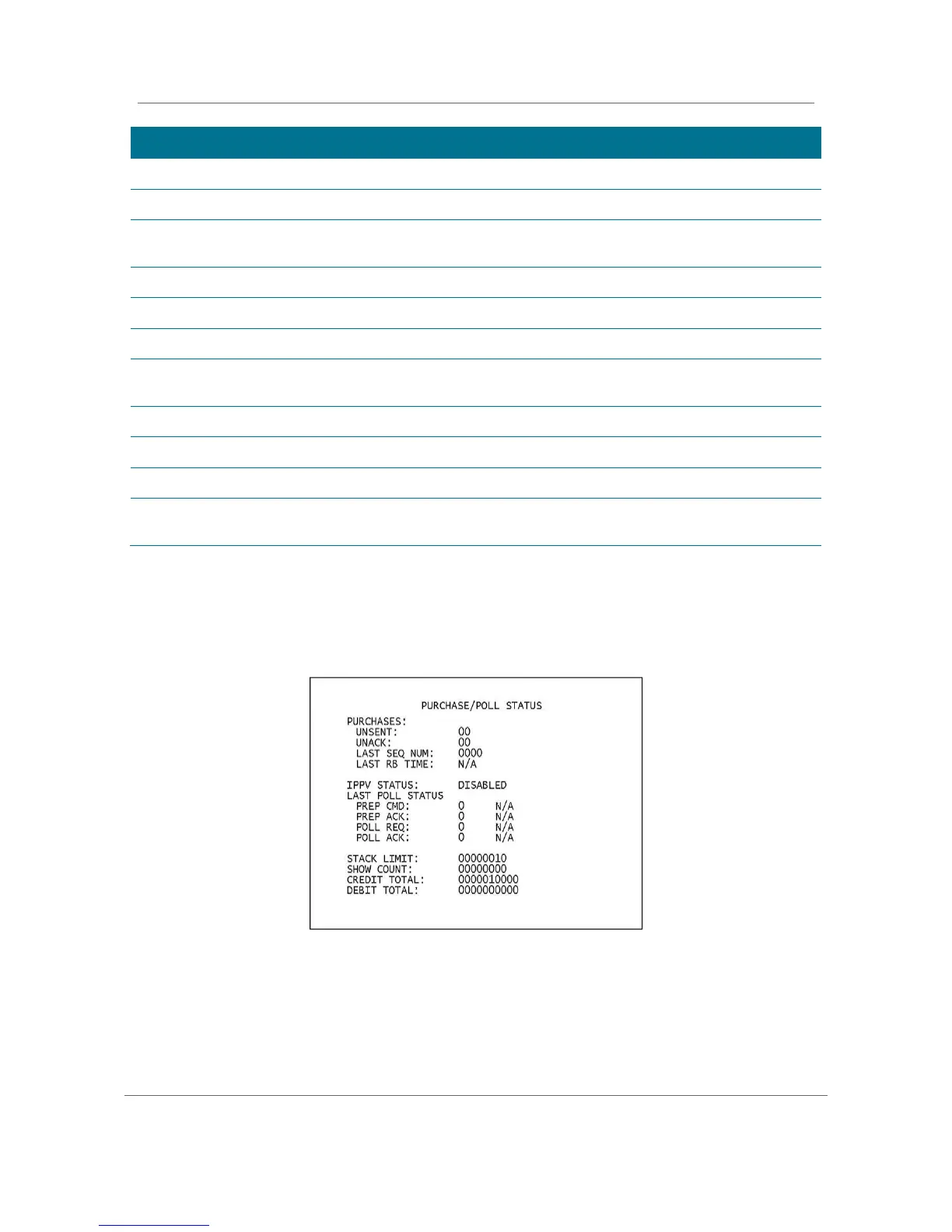
Purchase Status
This diagnostic displays the status of subscriber event purchases on the OSD and front
panel. The OSD and front panel displays are updated each time this diagnostic is viewed:
Figure 23: Purchase Status Diagnostic Screen



 To Next Page
 Loading...





