Introduction Installation Troubleshooting Glossary License
SBV5121 VoIP Cable Modem User Guide 31
Verifying the IP Address in Windows 2000 or Windows XP
To check the IP address:
1 On the Windows Desktop, click Start.
2 Select Run. The Run window is displayed.
3 Type cmd and click OK.
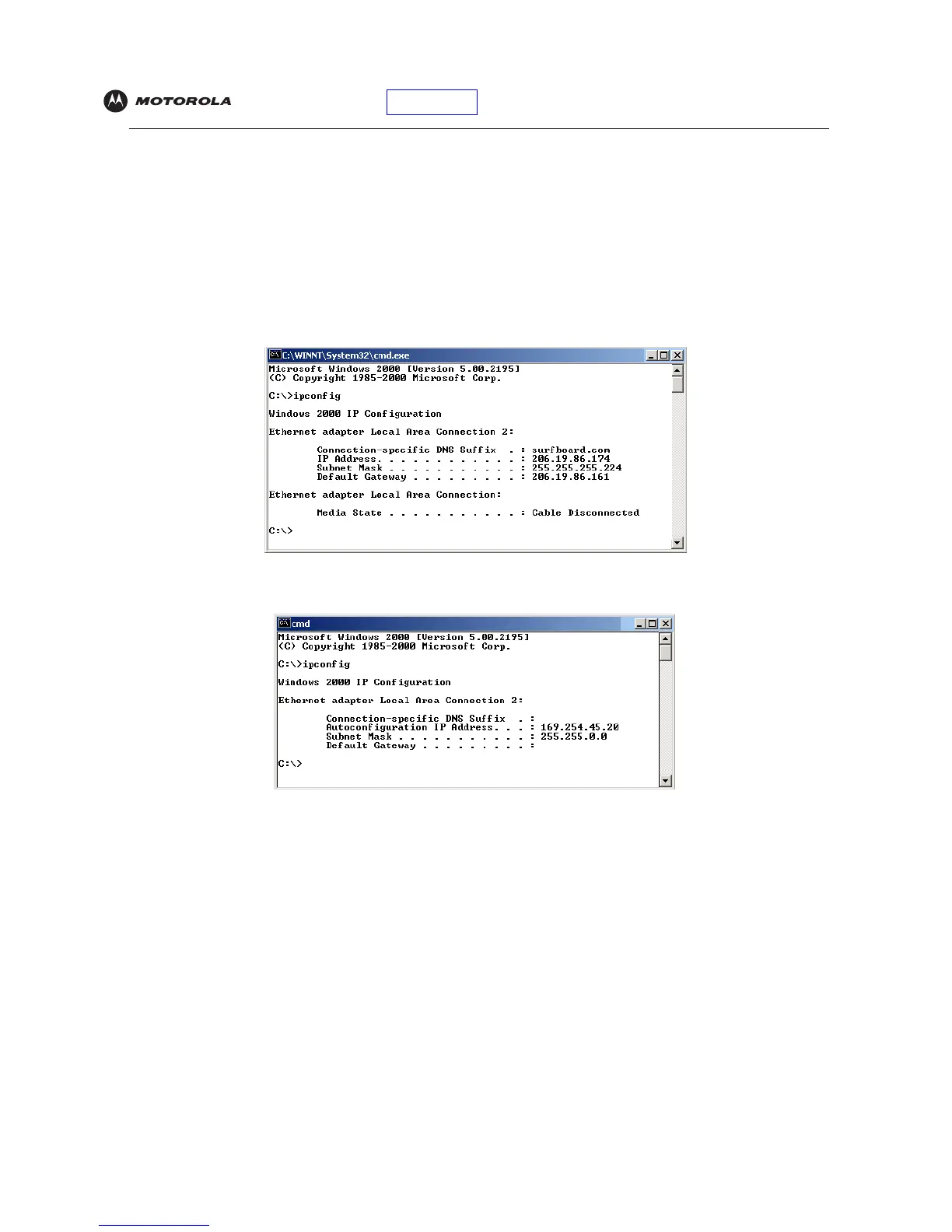
4 Type ipconfig and press ENTER to display your IP configuration. A display, like below, indicates a normal
configuration:
If an Autoconfiguration IP Address is displayed as in the window below, there is an incorrect connection
between your PC and the VoIP cable modem or there are cable network problems.
Check:
• Your cable connections
• Whether you can see cable-TV channels on your television
After successfully verifying your cable connections and proper cable-TV operation, you can renew your IP
address.


 To Next Page
 Loading...