Introduction Installation Troubleshooting Glossary License
SBV5121 VoIP Cable Modem User Guide 36
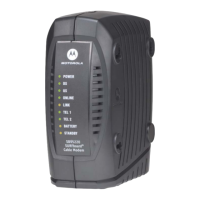
Front-Panel Lights and Error Conditions
If a telephone line is properly connected and the Tel 1 or Tel 2 light remains off, the line has not been set up for
service. Contact your service provider.
For more information about the lights, see “Top and Front Panel” on page 3.
Light Turns Off During Startup If Turns Off During Normal Operation If
Power The VoIP cable modem is not properly plugged
into the power outlet
The VoIP cable modem is unplugged or is in standby
mode. Press the Standby button
DS
(Receive)
The receive channel cannot be acquired The receive channel is lost
US
(Send)
The send channel cannot be acquired The send channel is lost
Online IP registration is unsuccessful The IP registration is lost
Tel 1 or
Tel 2
If the Tel light fails to flash during startup,
telephone line configuration has failed.
Connected during a phone call and does not blink,
telephone connection is lost.


 To Next Page
 Loading...